

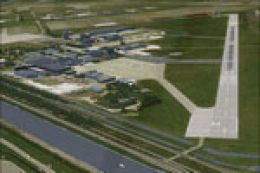
 FSX Scenery
NL2000 V4.02 Den Helder Airport
Experience the intricacies of Den Helder Airport (EHKD) with this free FSX sc…
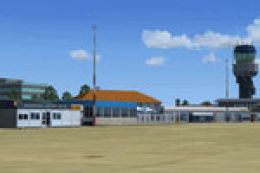
Den Helder Airport (EHKD) gets a faithful NL2000 v4 treatment with photoreal ground coverage, accurate runway and taxiway geometry, crisp apron markings, and custom buildings that capture both civilian traffic and Royal Netherlands Navy operations. Built for FSX, it requires the NL2000 v4 installer and blends cleanly with surrounding Netherlands scenery.
 Rate
Rate
 Netherlands
This add-on provides a rich simulation environment centered around Den Helder Airport (EHKD), commonly referred to as De Kooy, offering custom photoreal coverage and precise ground layouts. It is a dedicated package for version 4 of the NL2000 scenery, which is renowned for its modular approach and expansive portrayal of the Netherlands in FSX. Created by The Netherlands 2000 Scenery Design Team, this freeware release blends seamlessly into the broader NL2000 environment, delivering both civilian and military airport elements.
Den Helder Airport, positioned on the northern coast of the Netherlands, plays a strategic role for the Royal Netherlands Navy while also handling civilian air traffic. In this scenery package, the airport layout is carefully depicted with custom structures, detailed apron markings, and high-resolution ground images. The team has also included optimum support for regional terrain, ensuring a faithful rendering of the unique coastal surroundings. Moreover, users can expect smooth integration with adjacent NL2000 segments for an uninterrupted experience across the entire country.
The NL2000 v4 framework adopts a component-based design, meaning you can selectively install specific Dutch regions without affecting overall performance. This Den Helder Airport package is one such module, requiring the same NL2000 v4 installer for proper setup.
High-definition ground imagery and carefully mapped rooftops ensure the airport landscape appears remarkably close to reality. The developers employed advanced texture layering to achieve consistent visual fidelity across hangars, terminals, and surrounding fields.
Runway geometry and taxiway alignments have been aligned with current charts, reflecting the correct lengths, headings, and navigational aids. In addition, ramp positions and parking stands accommodate a variety of aircraft sizes, supporting both civilian and military operations.
This scenery is provided at no cost by The Netherlands 2000 Scenery Design Team. They have meticulously tested performance and visual realism, making this package an ideal choice for those who enjoy flying around the North Sea coastline or practicing challenging approaches into an active naval airfield.
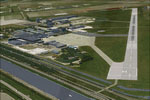
NL2000 V4.0 Den Helder Airport Scenery.
This package highlights a critical airport in northwestern Holland and caters to both casual flyers and enthusiasts who want precise detail. All aspects of this freeware scenery reflect the dedication and expertise of The Netherlands 2000 Scenery Design Team, ensuring that every simulation enthusiast can enjoy an authentic experience when flying in and out of Den Helder.
Free for all simmers · 18.61 MB · Scanned clean Oct 2026
Download speed: Free tier is capped at 0.5 Mbps (this file takes approximately 5 mins at the cap). PRO members download at full line speed.
FSX\Addon Scenery\ containing scenery and texture sub-folders.readme.txt or README file. It tells you exactly where files go, what dependencies are needed, and any quirks specific to this add-on.Use these coordinates to fly directly to this location once the mod is installed.
52.92340000,4.78060000
Launch FSX or Prepar3D and use Flights → Load to open the downloaded .pln file. Your aircraft will be positioned at this location.
The archive nl2k_v4_ehkd.zip has 8 files and directories contained within it.
This list displays the first 500 files in the package. If the package has more, you will need to download it to view them.
| Filename/Directory | File Date | File Size |
|---|---|---|
| nl2k_v4_ehkd.gif | 05.24.10 | 13.76 kB |
| FILE_ID.DIZ | 05.24.10 | 362 B |
| nl2k_v4_ehkd.nl2 | 05.21.10 | 18.67 MB |
| nl2k_v4_ehkd.txt | 05.22.10 | 354 B |
| copyright.txt | 05.24.10 | 4.43 kB |
| auteursrecht.txt | 05.24.10 | 5.06 kB |
| flyawaysimulation.txt | 10.29.13 | 959 B |
| Go to Fly Away Simulation.url | 01.22.16 | 52 B |
Only PRO members can place votes.
More FSX & P3D add-ons hand-picked based on this download.
FSX Scenery
Experience the intricacies of Den Helder Airport (EHKD) with this free FSX sc…
 FSX Scenery
FSX De Kooy And Den Helder Airport, The Netherlands (EHKD).
 FSX Scenery
Enhance your simulator’s portrayal of one of the Netherlands’ busiest regiona…
 FSX Scenery
This comprehensive scenery package brings an authentic representation of Eind…
 FSX Scenery
This free add-on offers a precisely modeled depiction of EHEH Eindhoven Airpo…
 FSX Scenery
This comprehensive package brings an updated rendition of Maastricht Aachen A…
 FSX Scenery
Enhance your virtual journey in FSX by adding a meticulously detailed renditi…
 FSX Scenery
This airport enhancement transforms Groningen Airport Eelde (EHGG) within Mic…
Be the first to leave a comment on this download.
Be the first to share your thoughts on this download.