


 Australia
  FSX Scenery
Old Bar Heritage Airstrip
Old Bar Heritage Airstrip Scenery Updated, Tyagarah, New South Wales, Austral…
Old Bar Heritage Airport (YOBR) scenery brings the small New South Wales, Australia airstrip to life with accurate airport layout, custom object placement, and immersive local surroundings for VFR hops and circuit work. Designed for Microsoft Flight Simulator X, it adds a focused regional destination that blends naturally with nearby terrain and autogen.
Scenery YOBR Old Bar. Old Bar Heritage Airport a small airstrip In New South Wales, Australia. By Nicholas Cole.
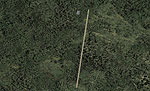
YOBR Old Bar Scenery.
For FSX only but havent tested in FS9.
When flying at old bar please remember to turn the Autogen settings down and the other one too.
Installation instructions:
Extract YOBR_ADE_N and YOBR_ADE_N_OBJ then copy those two files into your C:\Program Files\Microsoft Games\Microsoft Flight Simulator X\Addon Scenery\scenery folder now you are ready to go.
IF YOU DO NOT AGREE TO THIS THEN DONT INSTALL THIS:
Do not say this is made by you.
Free for all simmers · 2.29 MB · Scanned clean Oct 2026
Download speed: Free tier is capped at 0.5 Mbps. PRO members download at full line speed.
FSX\Addon Scenery\ containing scenery and texture sub-folders.readme.txt or README file. It tells you exactly where files go, what dependencies are needed, and any quirks specific to this add-on.Use these coordinates to fly directly to this location once the mod is installed.
-31.96500000,152.58900000
Launch FSX or Prepar3D and use Flights → Load to open the downloaded .pln file. Your aircraft will be positioned at this location.
The archive yobrfsx.zip has 6 files and directories contained within it.
This list displays the first 500 files in the package. If the package has more, you will need to download it to view them.
| Filename/Directory | File Date | File Size |
|---|---|---|
| README.txt | 06.28.10 | 654 B |
| YOBR Aerial.BMP | 06.28.10 | 3.74 MB |
| YOBR_ADE_N.BGL | 06.28.10 | 2.06 kB |
| YOBR_ADE_N_OBJ.BGL | 06.28.10 | 302 B |
| flyawaysimulation.txt | 10.29.13 | 959 B |
| Go to Fly Away Simulation.url | 01.22.16 | 52 B |
Only PRO members can place votes.
More FSX & P3D add-ons hand-picked based on this download.
FSX Scenery
Old Bar Heritage Airstrip Scenery Updated, Tyagarah, New South Wales, Austral…
 FSX Scenery
Bar-le-Duc (France) and its LFEU airfield a few miles south of Verdun. Hi res…
 FSX Scenery
Patch for Scenery of Bar-le-Duc (France) LFEU "Hauts-de-Chee" airfield. Requi…
 FSX Scenery
Old Warden Update (EGTZ), UK, v2 for use with ALFS_OLD_WARDEN_V2.ZIP. By Alf …
 FSX Scenery
Old Buckenham Airport in Norfolk UK. This old wartime US bomber base now used…
 FSX Scenery
Old Rhinebeck Aerodrome (NY94), New York (NY). Here is an improved version of…
 FSX Scenery
Old Bridge Airport (3B6), Old Bridge, New Jersey (NJ). An improved version of…
FSX Scenery
Old Bridge Airport (3N6), New Jersey (NJ). Located 5 miles south of Old Bridg…
Be the first to leave a comment on this download.
Be the first to share your thoughts on this download.