

 Dominica
  FSX Scenery
FSX Skara Bonaire X
Skara Scenery Bonaire X. Flamingo International Airport or Bonaire Internatio…
DominicaX recreates the Commonwealth of Dominica for FSX with over 750 square kilometers of photoreal terrain, hand-placed autogen, custom scenery objects, and ambient traffic. It also delivers AI-compatible, up-to-date airport layouts with bespoke Gmax buildings and day-focused visuals, supported by included night textures for extra atmosphere.
Scenery DominicaX, a complete photoreal scenery representation of The Commonwealth of Dominica. Over 750 sq. km. of phototextures, hand placed autogen, scenery objects and traffic, and fully-AI compatible accurate representations of the airports using custom made Gmax buildings. By Zev C. Richards and Jean Louis Valladier.
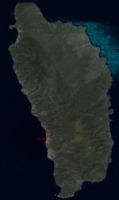
Aerial shot of DominicaX Scenery.
This scenery package, over a year in the making, is a complete Photoreal scenery representation of my home country of The Commonwealth of Dominica. Over 750 sq. km. of phototextures, hand placed autogen, scenery objects and traffic. This package also includes fully-AI compatible accurate representations of the airports as of present day using custom made GMAX buildings. This package is made to be over 99% accurate, with a few creations made from memory and imagination where FSX limitations and lack of data prevented perfect depictions. Although this is only my first ever scenery creation, I can safely say, this package has been created with great care to ensure maximum accuracy, rivaling the quality of many photoreal scenery payware packages for the Caribbean. While hand made night textures are provided with this package, this is primarily a day time package. Prepare to enjoy a magnificent FREEWARE scenery package that truly looks like the real thing!!!
INSTALLATION:
***IMPORTANT!!!: If you have already installed "dominica.zip" by JL Valladier then you must remove it to prevent any issues with this package. An improved version of his scenery has been included in this package.***
Simply run the setup.exe and follow the instructions.
UNINSTALLATION:
Run the provided uninstall program.
KNOWN ISSUES:
- Textures are not perfectly lined up in some areas where High Resolution Photoscenery blends into Lower Resolution areas.
- Areas of Autogen trees may pop in and out of view on some systems. This can be fixed sometimes by panning the view around.
- The runway at Melville Hall is actually 1600m long instead of 1451m. Currently avialable satellite imagery is from 2006 and this extension was made into the sea in 2009. Therefore, it cannot be represented without manually creating the photoreal textures to represent the runway as of 2010. This may be fixed in a future release.
CREDITS:
ALL CREDIT FOR THE AIRPORT BUILDING MODELS GO TO THE VERY TALENTED MR. JEAN-LOUIS VALLADIER.
Object placement was modified by me, Zev C. Richards to better represent the airports as of present day.
Thanks also to the Simviation Forums Beta Testing team who provided great feedback:
- Bob70
- den19
- Hughes-MDflyer4
While every effort has been made to ensure the quality and compatibility of this package, I do not assume any responsibility should this package damage or harm your PC, FSX or any other installed software in any way.
----You are installing them at your own risk.---
Thanks
Zev C. Richards
Free for all simmers · 134.53 MB · Scanned clean Oct 2026
Download speed: Free tier is capped at 0.5 Mbps (this file takes approximately 38 mins at the cap). PRO members download at full line speed.
FSX\Addon Scenery\ containing scenery and texture sub-folders.readme.txt or README file. It tells you exactly where files go, what dependencies are needed, and any quirks specific to this add-on.Use these coordinates to fly directly to this location once the mod is installed.
15.30920000,-61.37920000
Launch FSX or Prepar3D and use Flights → Load to open the downloaded .pln file. Your aircraft will be positioned at this location.
The archive dominicax_setup.zip has 6 files and directories contained within it.
This list displays the first 500 files in the package. If the package has more, you will need to download it to view them.
| Filename/Directory | File Date | File Size |
|---|---|---|
| DominicaX_setup.exe | 09.10.10 | 134.48 MB |
| dx_readme.txt | 09.10.10 | 5.66 kB |
| file_id.diz | 09.11.10 | 440 B |
| DominicaX_Setup.png | 09.11.10 | 48.13 kB |
| flyawaysimulation.txt | 10.29.13 | 959 B |
| Go to Fly Away Simulation.url | 01.22.16 | 52 B |
Only PRO members can place votes.
More FSX & P3D add-ons hand-picked based on this download.
FSX Scenery
Skara Scenery Bonaire X. Flamingo International Airport or Bonaire Internatio…
 FSX Scenery
Iwo Jima Scenery 1945 Update. This is a complete scenery with added effects a…
FSX Scenery
Kjeller Area Scenery X, Norway. Scenery around Kjeller airport with photoreal…
 FSX Scenery
FSX Loney's Alaska For FSX. This is a compilation of the author's Alaskan sce…
 FSX Scenery
For users of Flight Simulator X (and FSX: Steam Edition) and/or Prepar3D, ter…
 FSX Scenery
This freeware release by developer Aime Leclercq introduces revised highways …
 FSX Scenery
Team GEX Enhanced Autogen World. This package upgrades 522 world wide autogen…
 FSX Scenery
Princess Juliana International Airport (TNCM) in Saint Marteen, Netherlands A…
Read what other simmers think, or add your own.

For almost 10 years this has been one of my favorite freeware scenery of the Caribbean!