


 France
  FSX Scenery
Nancy V2
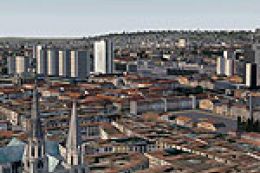
Nancy, France, version 2. Major update of v1 of LFSN airport landclass redraw…
Aerodrome de Nancy-Malzeville (LFEZ) scenery brings this local airfield near Nancy in eastern France to life with accurate ground features and a prominent 220 m TV antenna that flashes day and night. Designed for Microsoft Flight Simulator X Acceleration, it also runs in the standard FSX edition.
Aerodrome de Nancy-Malzeville (LFEZ), Malzeville, France. This scenery adds one of the three local airfields in the vicinity of Nancy, eastern France. Also includes a 220m TV antenna flashing day and night. Developed for FSXA but should work with FSX Standard. By D. Bur.
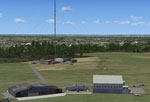
Screenshot of Aerodrome de Nancy-Malzeville Scenery.
Installation:
Unzip the archive in your Addon scenery folder (or anywhere you are used to store your sceneries). This will add a LFEZ folder with 3 subfolders "Effects", "scenery" and "texture":
C:\program files\microsoft games\microsoft flight simulator x\Addon scenery\LFEZ\
Important: to have the TV antenna flash, do the following:
Browse to the "Effects" folder in the LFEZ folder, cut fx_lfez_Flash.fx and move it to your FSX Effects folder.
Delete the LFEZ/Effects folder.
Declare the scenery in your FSX library as usual.
Free for all simmers · 1.54 MB · Scanned clean Oct 2026
Download speed: Free tier is capped at 0.5 Mbps. PRO members download at full line speed.
FSX\Addon Scenery\ containing scenery and texture sub-folders.readme.txt or README file. It tells you exactly where files go, what dependencies are needed, and any quirks specific to this add-on.Use these coordinates to fly directly to this location once the mod is installed.
48.72000000,6.20000000
Launch FSX or Prepar3D and use Flights → Load to open the downloaded .pln file. Your aircraft will be positioned at this location.
The archive lfez_fsx.zip has 16 files and directories contained within it.
This list displays the first 500 files in the package. If the package has more, you will need to download it to view them.
| Filename/Directory | File Date | File Size |
|---|---|---|
| lfez.jpg | 04.25.11 | 17.23 kB |
| readme_lfez.txt | 04.25.11 | 4.78 kB |
| lisezmoi_lfez.txt | 04.25.11 | 4.73 kB |
| VAC_LFEZ.pdf | 03.28.11 | 128.75 kB |
| FILE_ID.DIZ | 04.25.11 | 260 B |
| fx_lfezFlash.fx | 04.24.11 | 4.77 kB |
| LFEZ_ADEX_DB.BGL | 04.25.11 | 438.96 kB |
| LFEZ_ADEX_DB_CVX.bgl | 04.25.11 | 5.66 kB |
| LFEZ_Lib.bgl | 04.03.11 | 6.13 kB |
| lfez_lights.bgl | 04.12.11 | 592 B |
| ACB1.dds | 04.09.11 | 1.33 MB |
| ACB2.dds | 04.09.11 | 170.78 kB |
| lfez_hg1t1.dds | 04.09.11 | 682.79 kB |
| lfez_hg2t1.dds | 04.17.11 | 682.80 kB |
| flyawaysimulation.txt | 10.29.13 | 959 B |
| Go to Fly Away Simulation.url | 01.22.16 | 52 B |
Only PRO members can place votes.
More FSX & P3D add-ons hand-picked based on this download.
FSX Scenery
Nancy, France, version 2. Major update of v1 of LFSN airport landclass redraw…
 FSX Scenery
Metz Nancy Lorraine (LFJL), France, v3. By Alexandre Remy. Installation: Befo…
 FSX Scenery
Nancy-Pont Saint-Vincent, France, and airfield LFSV that is not part of FSX s…
 FSX Scenery
Military Airport Of Nancy-Ochey (LFSO), France. This pack contains the milita…
 FSX Scenery
Nancy-Azelot Airfield, France, a few miles south of Nancy, that is not in FSX…
 FSX Scenery
Jastarnia Aerodrome (EPJA), located on the Hel Peninsula, Poland. It is a sma…
 FSX Scenery
Ardmore Aerodrome (NZAR), New Zealand. Photoreal scenery featuring accurately…
 FSX Scenery
Wilkins Aerodrome (YWKS), Antarctica. Wilkins Airport is mainly for arrivals …
Be the first to leave a comment on this download.
Be the first to share your thoughts on this download.