

 FSX Historic & Vintage Aircraft
North American P-51D-15-NA's 356th FG
This file contains two texture sets for the Warbirdsim P-51D Mustang 'Little …
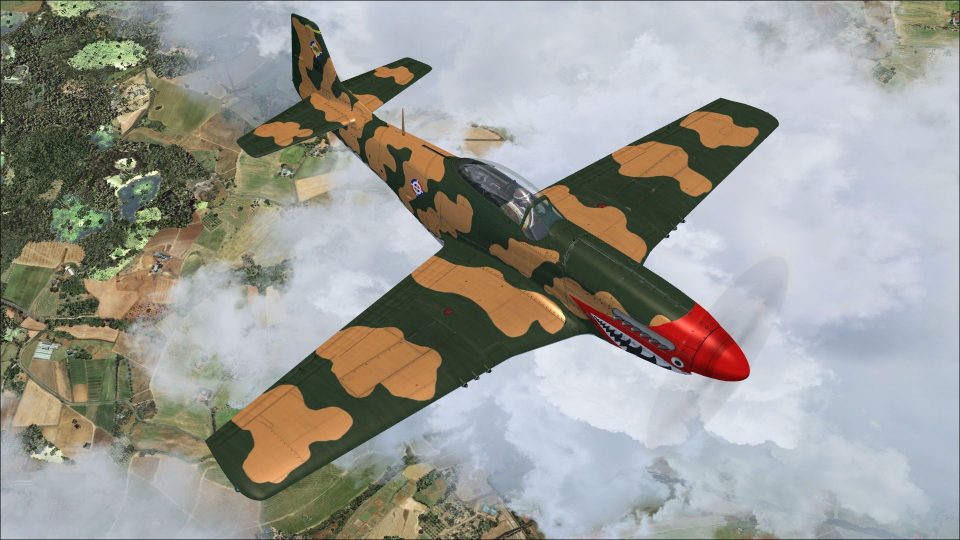
Dominican Republic Air Force P-51D-5-NA FAD-1900 brings a rare 1970-era Mustang scheme to life with distinctive shark-tooth nose art and period markings, tracing 44-13917 from Sweden’s Flygvapnet to service at San Isidro and Puerto Plata. Designed for FSX and requires the Warbirdsim P-51D-5-NA “Little Friends II” base package.
 Rate
Rate
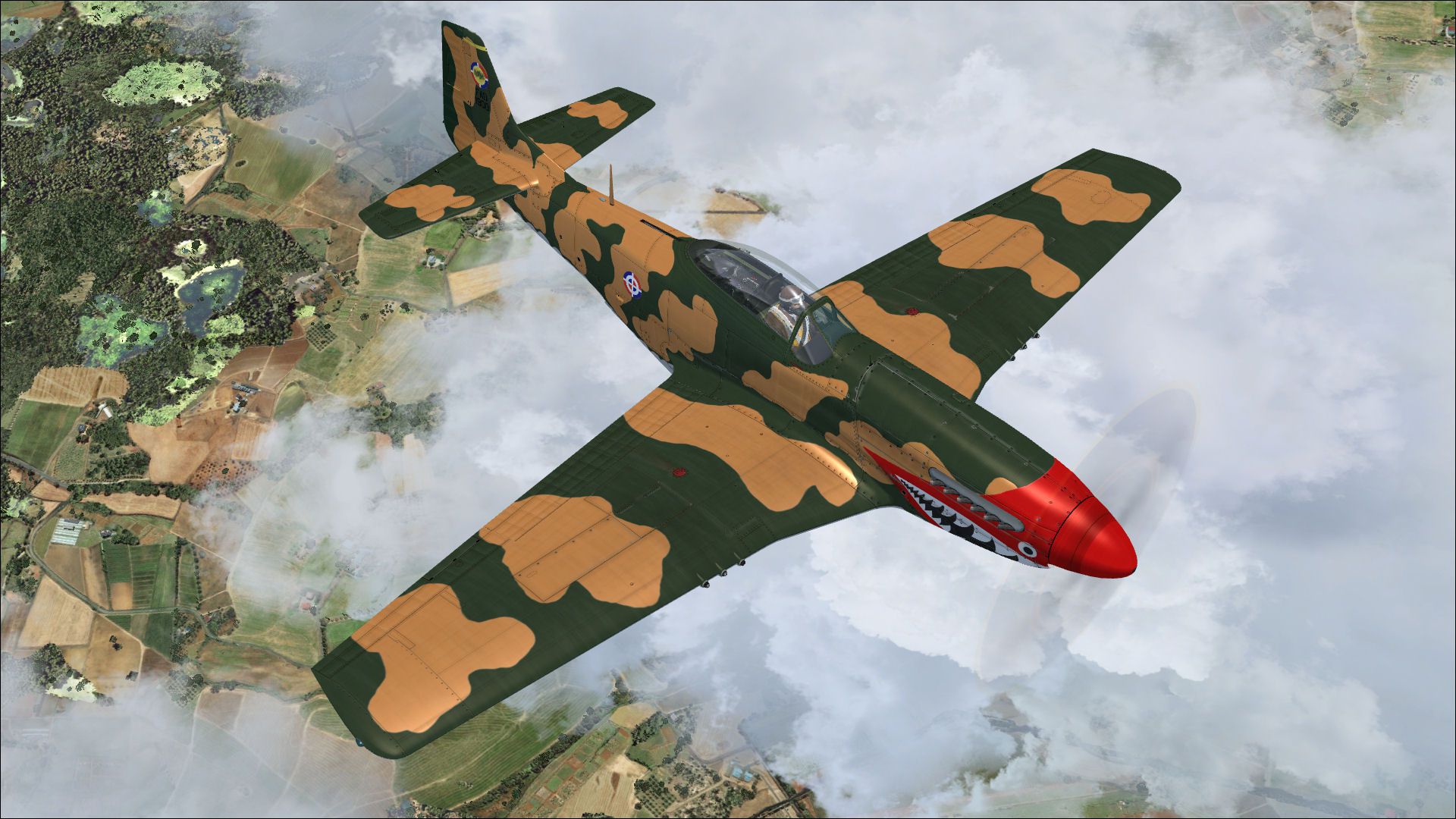
A historical representation of a Dominican owned and operated P-51D Mustang, circa 1970. This aircraft 44-13917, was interned in Sweden, fall of '44. It then became 26004 of the Swedish Air Force at Uppsala. In 1952, the Dominican Republic purchased many Mustangs from Sweden. Eventually, many of them were painted with Shark-Teeth, though the color and variation was of wide variety. This aircraft depicts FAD-1900, a rare D-5 model. By Joseph Thompson, courtesy of John Terrell.
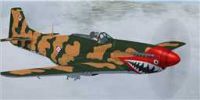
Screenshot of Dominican Republic P-51D-5-NA FAD-1900 in flight.
This folder contains a repaint for the Warbirdsim P-51D-5-NA "Little Friends II" package. This skin is a historical representation of a Dominican owned and operated mustang, circa 1970. It was originally NAA s/n 27550, US AAF 44-13917. This P-51D-5-NA, was D7-L "You've Had it", of the 503rd FS, 339th FG, was interned in Sweden, fall of '44. It became 26004 of the Swedish Air Force at Uppsala.
Then, later it sold to the Dominican Republic, 1952 (perhaps October), and labeled for FAD "1900". (The first mustang of two to wear "1900").
The Dominican Republic purchased many mustangs from Sweden in the early fifties. I believe FAD-1900(1) was the only D-5 model, owned by the Dominican Republic.
They operated out of Base Aérea de San Isidro, and Base Aérea de Puerto Plata.
INSTALLATION:
1. Unzip to a temporary location.
2. Copy the "Texture.FAD1900" folder in this download to your "P-51D-5-NA Little Friends_Fillet" folder in FSX.
3. Copy and paste the following text into the aircraft.cfg file inside the 'P-51D-5-NA Little Friends_Fillet' folder (replacing the X with the next numbers in sequence after your last existing paint scheme (if the last paint scheme already on the list is fltsim.6, this should be fltsim.7).
[fltsim.x]

title = Warbirdsim P-51D Mustang "Little Friends - P-51D-5-NA FAD 1900"

sim = P-51D

model = Fillet

panel =

sound =

texture = FAD1900

panel_alias =

sound_alias =

kb_checklists =

kb_reference =

atc_id = 1900

atc_id_color =

atc_parking_types =

atc_parking_code =

atc_airline=

atc_flight_number=

ui_manufacturer = North American Aviation

ui_type = WWII P-51D Mustang

ui_variation = "FAD-1900"

description = This P-51D-5-NA, originally D7-L "You've Had it", of the 503rd FS, 339th FG, was interned in Sweden, fall of '44. It became 26004 of the Swedish Air Force at Uppsala. Then, later it sold to the Dominican Republic, 1952 (perhaps October), and labeled for FAD "1900". (The first mustang of two to wear "1900")

visual_damage = 0
4. Have fun flying!
All credit is due the original author, John Terrel.
Joseph Thompson
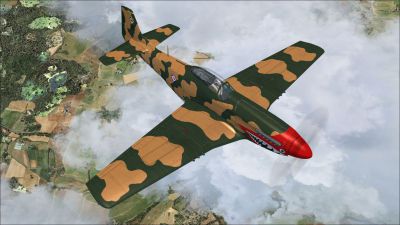
Screenshot of Dominican Republic P-51D-5-NA FAD-1900 in the air.
Free for all simmers · 24.9 MB · Scanned clean Oct 2026
Download speed: Free tier is capped at 0.5 Mbps (this file takes approximately 7 mins at the cap). PRO members download at full line speed.
texture.{airline}) inside FSX\SimObjects\Airplanes\{base-aircraft}\.aircraft.cfg in Notepad. Add a new [fltsim.X] section per the readme.readme.txt or README file. It tells you exactly where files go, what dependencies are needed, and any quirks specific to this add-on.The archive wbs_p-51d_5_na_fad1900.zip has 18 files and directories contained within it.
This list displays the first 500 files in the package. If the package has more, you will need to download it to view them.
| Filename/Directory | File Date | File Size |
|---|---|---|
| image1.jpg | 03.16.12 | 338.40 kB |
| readme.txt | 03.16.12 | 2.14 kB |
| Texture.FAD1900 | 03.16.12 | 0 B |
| Exterior_Cockpit.dds | 12.16.11 | 1.00 MB |
| P-51D_2_T.dds | 03.16.12 | 16.00 MB |
| P-51D_2_T_Bump.dds | 12.16.11 | 4.00 MB |
| P-51D_2_TSpec.dds | 03.16.12 | 16.00 MB |
| P-51D_3_T.dds | 03.16.12 | 16.00 MB |
| P-51D_3_TSpec.dds | 03.16.12 | 16.00 MB |
| P-51D_Misc.dds | 12.16.11 | 1.00 MB |
| Placards.dds | 03.16.12 | 4.00 MB |
| Prop.dds | 12.16.11 | 256.12 kB |
| Prop_2.dds | 12.16.11 | 256.12 kB |
| test.bmp | 12.16.11 | 16.00 MB |
| texture.cfg | 12.16.11 | 189 B |
| Thumbnail.jpg | 03.16.12 | 4.62 kB |
| flyawaysimulation.txt | 10.29.13 | 959 B |
| Go to Fly Away Simulation.url | 01.22.16 | 52 B |
Only PRO members can place votes.
More FSX & P3D add-ons hand-picked based on this download.
FSX Historic & Vintage Aircraft
This file contains two texture sets for the Warbirdsim P-51D Mustang 'Little …
 FSX Historic & Vintage Aircraft
This file contains three texture sets for the Warbirdsim P-51D-5-NA Mustang, …
 FSX Historic & Vintage Aircraft
Here are two texture sets for the Warbirdsim P-51D-5-NA, depicting aircraft f…
 FSX Historic & Vintage Aircraft
Luftwaffe Douglas DC-2 'NA+LA'. This is a repaint for the Douglas DC2 package…
 FSX Historic & Vintage Aircraft
North American P-51D Mustang v1.1. The freeware Alphasim P-51 Mustang upgrade…
 FSX Historic & Vintage Aircraft
A2A Simulations P-47 Razorback III representing P-47C-20-RA 41-6271 HV-K and …
 FSX Historic & Vintage Aircraft
This edition of the P-47 Thunderbolt, inspired by the historic “Hun Hunter,” …
 FSX Historic & Vintage Aircraft
Warbirdsim North American Aviation P-51 Mustang Moonbeam McSwine ''Little Fri…
Be the first to leave a comment on this download.
Be the first to share your thoughts on this download.