

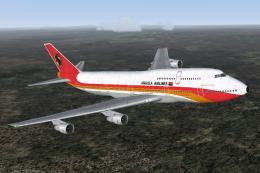
 FS2004 Civil Jet Aircraft
Boeing 747-312, TAAG Angola Airlines, D2-TEA
Construction number 23410, Line number 653 - delivered to Singapore Airlines …
TAAG Angola Airlines’ Boeing 747-300 brings classic wide-body operations to Microsoft Flight Simulator 2004 with a Project Open Sky model and sharp Yosuke Ube textures. Expect animated control surfaces, flexing wings, opening doors, detailed lighting and reflections, thrust reversers, and carefully tuned Pratt & Whitney performance for authentic handling.
 Rate
Rate
Experience an immersive simulation of the Boeing 747-300 adorned with TAAG Angola Airlines colors. This freeware add-on, crafted by Project Open Sky and repainted by Yosuke Ube, provides a high-fidelity model of this wide-body jet for enthusiasts looking to add historical realism to Microsoft Flight Simulator 2004. TAAG Angola Airlines has a rich heritage in African aviation, and this livery showcases their visual identity on a classic aircraft powered by Pratt & Whitney turbofan engines.
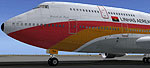
On the ground, the TAAG Boeing 747-300 presents its distinctive fuselage markings and detailed textures.
Once installed, you can select the TAAG Boeing 747-300 from your simulator’s aircraft menu. You will then be ready to embark on virtual flights reflecting TAAG Angola Airlines operations during the era of this variant. The detailed modeling, combined with Pratt & Whitney engine performance nuances, allows pilots to explore the classic wide-body design with enhanced authenticity.
Free for all simmers · 3.33 MB · Scanned clean Oct 2026
Download speed: Free tier is capped at 0.5 Mbps. PRO members download at full line speed.
FS9\Aircraft\, FS9\Addon Scenery\, FS9\Gauges\, or FS9\Effects\.readme.txt or README file. It tells you exactly where files go, what dependencies are needed, and any quirks specific to this add-on.The archive taagaa.zip has 11 files and directories contained within it.
This list displays the first 500 files in the package. If the package has more, you will need to download it to view them.
| Filename/Directory | File Date | File Size |
|---|---|---|
| posky743_bodyl_t.bmp | 10.08.04 | 4.00 MB |
| posky743_bodyr_t.bmp | 10.08.04 | 4.00 MB |
| posky743_doors_t.bmp | 10.08.04 | 4.00 MB |
| posky743_eng_JT9D_t.bmp | 10.08.04 | 4.00 MB |
| posky743_misc_t.bmp | 10.08.04 | 4.00 MB |
| posky743_vertical_t.bmp | 10.08.04 | 1.00 MB |
| posky743_wingbottom_t.bmp | 10.08.04 | 4.00 MB |
| posky743_wingtop_t.bmp | 10.08.04 | 4.00 MB |
| readme.txt | 10.08.04 | 2.96 kB |
| flyawaysimulation.txt | 10.29.13 | 959 B |
| Go to Fly Away Simulation.url | 01.22.16 | 52 B |
Only PRO members can place votes.
More FS2004 add-ons hand-picked based on this download.
FS2004 Civil Jet Aircraft
Construction number 23410, Line number 653 - delivered to Singapore Airlines …
 FS2004 Civil Jet Aircraft
Enhance your Microsoft Flight Simulator 2004 activities with this meticulousl…
 FS2004 Civil Jet Aircraft
Improve your collection in Microsoft Flight Simulator 2004 with this speciali…
 FS2004 Civil Jet Aircraft
This freeware release features a complete Boeing 767-300 PW in Air Canada’s l…
 FS2004 Civil Jet Aircraft
Model by Project Open Sky. Livery by Pantee Farhangi. Screenshot of Northwest…
 FS2004 Civil Jet Aircraft
This repaint set offers a meticulously aligned South African Airways Boeing 7…
 FS2004 Civil Jet Aircraft
Enhance your Microsoft Flight Simulator 2004 experience by adding a revitaliz…
 FS2004 Civil Jet Aircraft
Textures only for the Project Open Sky B747-200. Painted by Rene Bruun. Scree…
Be the first to leave a comment on this download.
Be the first to share your thoughts on this download.