

 FSX Civil Aircraft
Garuda Indonesia Boeing 737-800NG PK-GEP
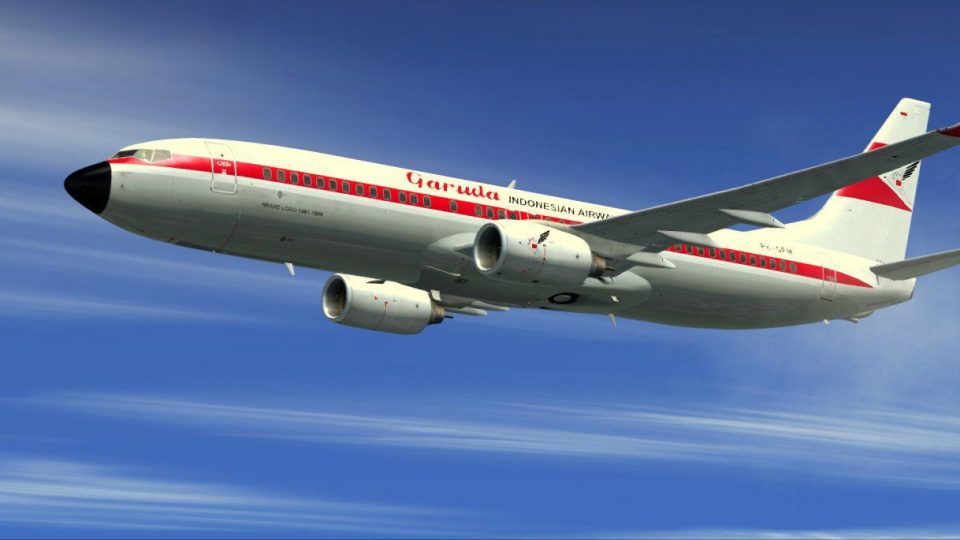
This Garuda Indonesia Boeing 737-800NG repaint applies a vintage Landor-inspi…
Garuda Indonesia’s heritage livery for Boeing 737-800NG PK-GFM brings a vintage national-carrier look to modern short-haul flying in Microsoft Flight Simulator X, with crisp fuselage, tail, and engine markings and accurate registration details. The repaint installs as texture-only and requires the PMDG 737 800/900 NGX base package.
 Rate
Rate


This classic repaint showcases Garuda Indonesia’s heritage look on a Boeing 737-800 bearing registration PK-GFM. It serves Microsoft Flight Simulator X pilots who seek a retro approach while flying a modern narrow-body jet. Developed by Febriant Leocesio, this release is freeware but calls for a payware model from Precision Manuals Development Group. Pilots who already own the PMDG 737 800/900 NGX base package can seamlessly incorporate this Garuda variant into their virtual hangar.
The vintage-styled exterior reflects an earlier era of Garuda Indonesia, the national airline of Indonesia. Though the Boeing 737-800 is renowned for its advanced cockpit instrumentation and efficient winglet configuration, this repaint merges that modernity with an aesthetic from decades past. The fuselage, tail, and engine nacelles are adorned with distinct markings that pay homage to Garuda’s legacy, all while showcasing the PK-GFM registration on the tail section.
The 737-800 series stands out for its range capabilities, improved fuel burn, and state-of-the-art avionics compared to prior generations. Operators around the globe, including Garuda Indonesia, value its reliability on domestic and regional routes. In Microsoft Flight Simulator X, the PMDG rendition of this aircraft is highly respected for its in-depth systems modeling and realistic flight dynamics, making it an exceptional platform for detailed texture enhancements such as this retro-themed exterior.
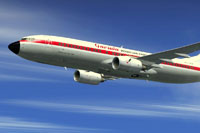
Above: Visual depiction of the Boeing 737-800 wearing historically inspired markings.
This download solely contains the texture files. To fully leverage the retro scheme, you must own the payware PMDG B737 800/900 NGX base package. If you do not yet have that software, it is available for purchase through authorized retailers, including places like SimShack. Once the base product is in place, you can deploy the PK-GFM repaint with minimal effort.
This retro repaint is brought to you by Febriant Leocesio. It delivers a classic appearance for the 737-800 without compromising the advanced features found in the PMDG model. By combining an appealing heritage look with the aircraft’s modern systems, users experience the best of both worlds during each flight rotation.
Free for all simmers · 15.96 MB · Scanned clean Oct 2026
Download speed: Free tier is capped at 0.5 Mbps (this file takes approximately 4 mins at the cap). PRO members download at full line speed.
texture.{airline}) inside FSX\SimObjects\Airplanes\{base-aircraft}\.aircraft.cfg in Notepad. Add a new [fltsim.X] section per the readme.readme.txt or README file. It tells you exactly where files go, what dependencies are needed, and any quirks specific to this add-on.The archive pk_gfm.zip has 7 files and directories contained within it.
This list displays the first 500 files in the package. If the package has more, you will need to download it to view them.
| Filename/Directory | File Date | File Size |
|---|---|---|
| GFM | 12.26.13 | 0 B |
| 2013-12-20_19-16-27-890.BMP.jpg | 12.20.13 | 83.16 kB |
| 2013-12-20_19-16-43-632.BMP.jpg | 12.20.13 | 149.38 kB |
| GFM.ptp | 12.24.13 | 15.75 MB |
| readme.txt | 12.26.13 | 608 B |
| flyawaysimulation.txt | 10.29.13 | 959 B |
| Go to Fly Away Simulation.url | 01.22.16 | 52 B |
Only PRO members can place votes.
More FSX & P3D add-ons hand-picked based on this download.
FSX Civil Aircraft
This Garuda Indonesia Boeing 737-800NG repaint applies a vintage Landor-inspi…
 FSX Civil Aircraft
This freeware repaint brings an authentic retro color scheme of Garuda Indone…
 FSX Civil Aircraft
A Garuda Indonesia - Skyteam livery repaint for the payware PMDG B737-800 NGX…
 FSX Civil Aircraft
Garuda Indonesia Boeing 737-800, registration PK-GMA. A repaint of the defaul…
 FSX Civil Aircraft
Textures only for the payware Overland Simmers Sky B737-800. Repaint by Febri…
 FSX Civil Aircraft
Garuda Indonesia Boeing 737-800, 123rd livery, registration PK-GFR. This is r…
 FSX Civil Aircraft
This repaint provides detailed textures of Garuda Indonesia’s Boeing 737-500 …
 FSX Civil Aircraft
Garuda Indonesia Boeing 737-800 (old livery), registration PK-GEE. A repaint …
Be the first to leave a comment on this download.
Be the first to share your thoughts on this download.