

 FSX Civil Aircraft
Titan Airways Boeing 757-256
Repaint of the Project Open Sky B757-200 for FSX only in Titan Airways livery…
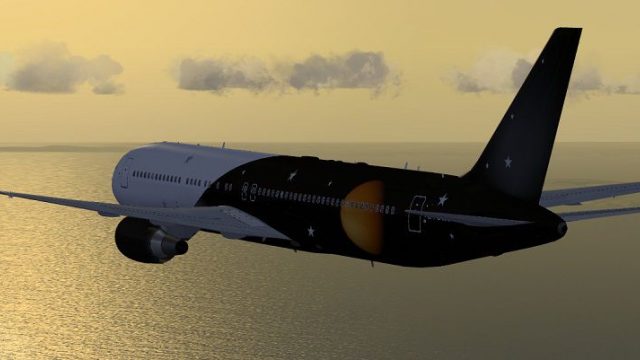
Titan Airways Boeing 767-36N/ER G-POWD brings a long-haul charter look to FSX with the SkySpirit2010 767-300ER v5 model, an FSX-native AI-friendly exterior, and a solid default 737-800 virtual cockpit. The package includes custom effects and a shared texture setup for clean livery management.
 Rate
Rate
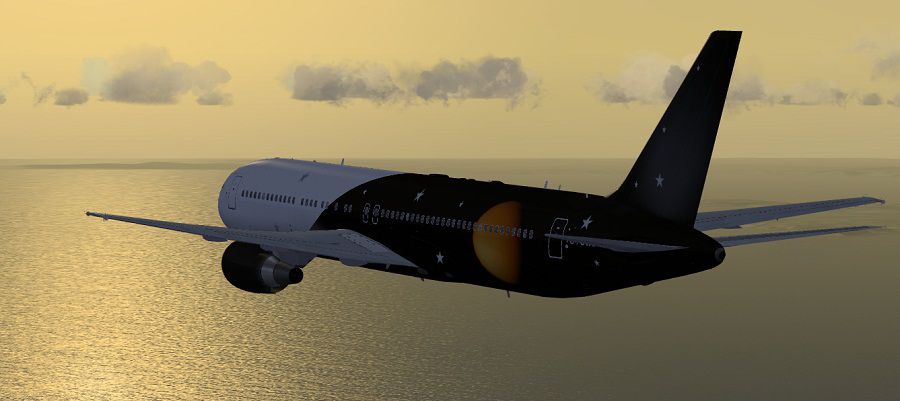
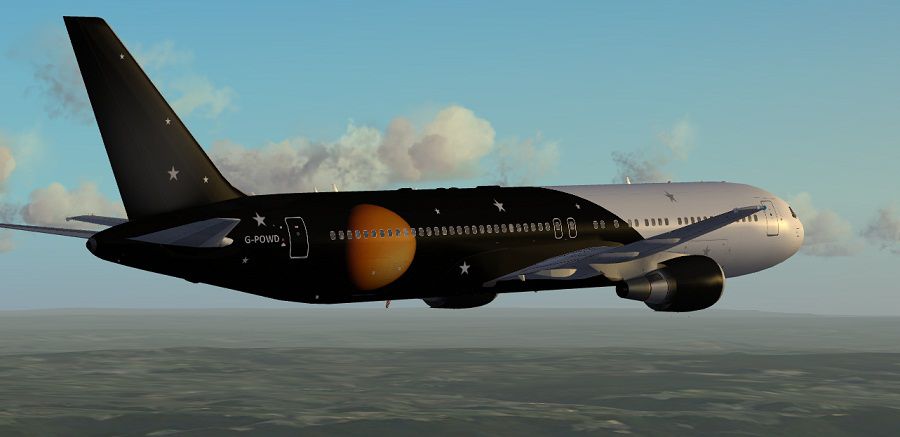
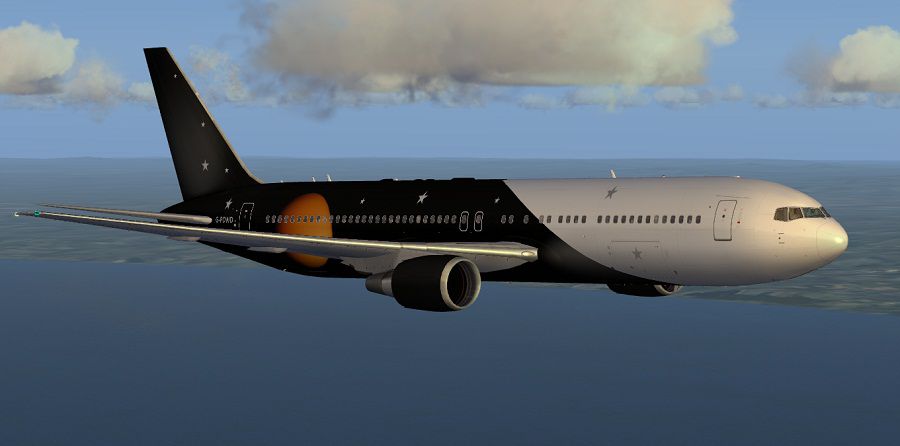
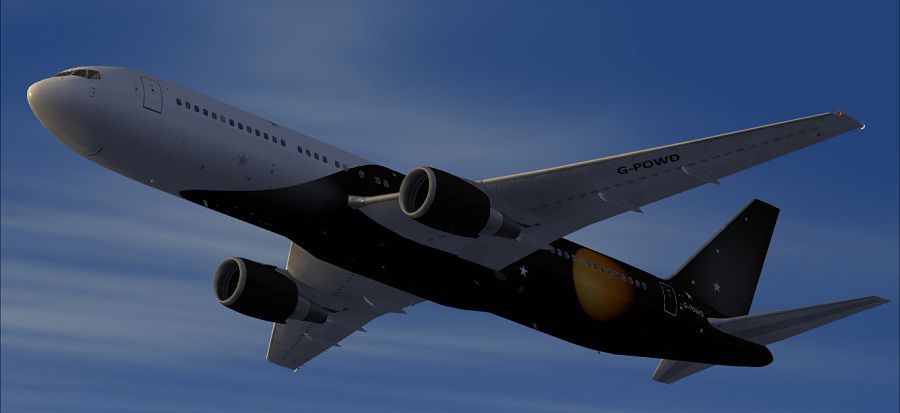
Complete package for FSX only of the Skyspirit2010 B767-300ER v5 in Titan Airways livery, registration G-POWD, CN 30847/902. Complete aircraft with default B738 VC and FSX AL model. Painted using the paint kit by Philip Foglar. Repaint by Paul Craig.
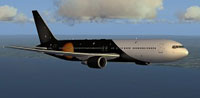
Screenshot of Titan Airways Boeing 767-36N/ER in flight.
Installation:
Adding New Liveries:
I have used a shared texture folder system using the FSX texture.cfg file to link texture folders. The main textures are in the "texture" folder which includes the VC textures. When you add new texture livery folders you can either just add a copy of the "texture.cfg" file to your complete new texture folder (so that the VC will work) or you can delete the common texture files from your new texture folder leaving just the texture files specific to the livery you want to add, but you will also need to add a copy of the "texture.cfg" file.
Free for all simmers · 17.03 MB · Scanned clean Oct 2026
Download speed: Free tier is capped at 0.5 Mbps (this file takes approximately 5 mins at the cap). PRO members download at full line speed.
FSX\SimObjects\Airplanes\. The folder must contain an aircraft.cfg file. Effects go into FSX\Effects\; gauges go into FSX\Gauges\.readme.txt or README file. It tells you exactly where files go, what dependencies are needed, and any quirks specific to this add-on.The archive titan_airways_ssp2010b767-300er.zip has 113 files and directories contained within it.
This list displays the first 500 files in the package. If the package has more, you will need to download it to view them.
| Filename/Directory | File Date | File Size |
|---|---|---|
| Boeing 767-300ER GE CF6-80C SkySpirit2010 | 05.26.12 | 0 B |
| 767-300ER-GE-CF6-80C2.air | 02.06.05 | 8.82 kB |
| Aircraft.cfg | 05.26.12 | 15.27 kB |
| model.AL | 05.26.12 | 0 B |
| B737_800_interior.mdl | 09.04.06 | 4.23 MB |
| Model.cfg | 05.26.12 | 73 B |
| OSX763ERV5_CF6-80C--AL.MDL | 02.16.12 | 2.49 MB |
| panel | 05.26.12 | 0 B |
| 737_compass.BMP | 05.12.06 | 95.51 kB |
| 737_Panel_Decals_2.bmp | 05.12.06 | 257.05 kB |
| 737-800_panel_background.bmp | 05.12.06 | 769.05 kB |
| 737-800_panel_background_night.bmp | 05.12.06 | 769.05 kB |
| B737_800.cab | 05.11.07 | 2.01 MB |
| panel.cfg | 07.27.06 | 6.08 kB |
| upper_640.bmp | 05.12.06 | 18.99 kB |
| Sound | 05.26.12 | 0 B |
| sound.cfg | 03.18.09 | 32 B |
| texture.Titan | 05.26.12 | 0 B |
| DECAL_OS763V5TAILLOGO.bmp | 05.25.12 | 4.00 MB |
| OS763V5_LFUSE_Front_L.BMP | 05.26.12 | 4.00 MB |
| OS763V5_LFUSE_Front_T.bmp | 05.25.12 | 4.00 MB |
| OS763V5_LFUSE_Mid_L.BMP | 05.26.12 | 4.00 MB |
| OS763V5_LFUSE_Mid_T.bmp | 05.26.12 | 4.00 MB |
| OS763V5_LFUSE_Rear_L.bmp | 05.26.12 | 4.00 MB |
| OS763V5_LFUSE_Rear_T.bmp | 05.25.12 | 4.00 MB |
| OS763V5_RFUSE_Front_L.BMP | 05.26.12 | 4.00 MB |
| OS763V5_RFUSE_Front_T.bmp | 05.25.12 | 4.00 MB |
| OS763V5_RFUSE_Mid_L.BMP | 05.26.12 | 4.00 MB |
| OS763V5_RFUSE_Mid_T.bmp | 05.26.12 | 4.00 MB |
| OS763V5_RFUSE_Rear_L.bmp | 05.26.12 | 4.00 MB |
| OS763V5_RFUSE_Rear_T.bmp | 05.25.12 | 4.00 MB |
| OS767Antenna.bmp | 05.26.12 | 256.07 kB |
| Os767CF6-80_fan.bmp | 04.14.12 | 1.00 MB |
| Os767cf6-80_Pylon_t.bmp | 05.02.12 | 4.00 MB |
| Os767cf6-80_t.bmp | 05.26.12 | 4.00 MB |
| OS767Option2.bmp | 05.26.12 | 256.07 kB |
| OS767Wing_L_T.bmp | 05.26.12 | 4.00 MB |
| OS767Wing_R_T.bmp | 05.26.12 | 4.00 MB |
| texture.cfg | 08.14.06 | 137 B |
| thumbnail.jpg | 05.26.12 | 9.57 kB |
| texture | 05.26.12 | 0 B |
| 737_Refection.dds | 09.05.06 | 170.79 kB |
| B737_800_1_C.dds | 09.05.06 | 682.79 kB |
| B737_800_1_night_C.dds | 02.03.12 | 512.12 kB |
| B737_800_2_C.dds | 09.05.06 | 682.79 kB |
| B737_800_2_night_C.dds | 02.03.12 | 512.12 kB |
| B737_800_3_C.dds | 09.05.06 | 682.79 kB |
| B737_800_3_night_C.dds | 02.03.12 | 512.12 kB |
| B737_800_4_C.dds | 09.05.06 | 682.79 kB |
| B737_800_4_night_C.dds | 02.03.12 | 512.12 kB |
| B737_800_5_C.dds | 09.05.06 | 170.79 kB |
| B737_800_5_night_C.dds | 09.05.06 | 170.79 kB |
| B737_800_C.bmp | 05.12.06 | 682.74 kB |
| B737_800_Interior.dds | 09.05.06 | 170.79 kB |
| DECAL_OS763V5.bmp | 12.05.10 | 4.00 MB |
| Os_wt500e_l.bmp | 10.22.08 | 1.00 MB |
| Os_wt500e_t.bmp | 10.21.08 | 1.00 MB |
| Os763V5_FLCARGOBAY_T.BMP | 11.26.09 | 1.00 MB |
| OS763V5_FSCARGOBAY_T.BMP | 09.16.09 | 1.00 MB |
| OS763V5_LFUSE_Front_L.BMP | 01.15.12 | 512.07 kB |
| OS763V5_LFUSE_Mid_L.BMP | 01.15.12 | 512.07 kB |
| OS763V5_LFUSE_Rear_L.bmp | 01.15.12 | 512.07 kB |
| OS763V5_RFUSE_Front_L.BMP | 01.15.12 | 512.07 kB |
| OS763V5_RFUSE_Mid_L.BMP | 01.15.12 | 512.07 kB |
| OS763V5_RFUSE_Rear_L.bmp | 01.15.12 | 512.07 kB |
| Os763V5_RSCARGOBAY_T.BMP | 09.16.09 | 1.00 MB |
| Os767_chock.bmp | 11.05.10 | 256.07 kB |
| Os767_Container_T.BMP | 09.16.09 | 4.00 MB |
| Os767_Interior_T.BMP | 09.07.09 | 4.00 MB |
| OS767_SPRING_T.BMP | 10.13.10 | 16.07 kB |
| Os767CF6-80_fan.bmp | 11.26.10 | 1.00 MB |
| Os767cf6-80_L.bmp | 12.05.10 | 4.00 MB |
| Os767cf6-80_Pylon_L.bmp | 12.05.10 | 4.00 MB |
| Os767cf6-80_Pylon_t.bmp | 12.05.10 | 4.00 MB |
| Os767cf6-80_t.bmp | 11.13.11 | 4.00 MB |
| OS767GSU1_T.BMP | 09.07.09 | 4.00 MB |
| OS767GSU2_T.BMP | 09.06.09 | 4.00 MB |
| OS767Option.bmp | 11.23.10 | 64.07 kB |
| OS767V5_Parts_L.bmp | 03.25.07 | 1.07 kB |
| OS767V5_Parts_T.BMP | 11.20.10 | 4.00 MB |
| OS767V5_Parts2_L.bmp | 12.06.10 | 4.00 MB |
| OS767V5_Parts2_T.bmp | 12.02.10 | 4.00 MB |
| OS767V5_Parts3_T.bmp | 10.24.10 | 4.00 MB |
| OS767Wing_L_L.BMP | 12.01.10 | 4.00 MB |
| OS767Wing_R_L.BMP | 12.01.10 | 4.00 MB |
| OS767Wing2_L_L.bmp | 12.01.10 | 1.00 MB |
| OS767Wing2_L_T.bmp | 12.05.10 | 1.00 MB |
| OS767Wing2_R_L.bmp | 12.01.10 | 1.00 MB |
| OS767Wing2_R_T.bmp | 12.05.10 | 1.00 MB |
| Pilots_737.dds | 09.05.06 | 42.79 kB |
| texture.cfg | 08.14.06 | 137 B |
| Effects | 05.26.12 | 0 B |
| Opensky_747_vclight.fx | 10.02.02 | 1.31 kB |
| Opensky_beacon.fx | 02.12.02 | 3.04 kB |
| Opensky_conden.fx | 10.03.02 | 3.15 kB |
| Opensky_condens.fx | 09.08.02 | 2.71 kB |
| Opensky_logo_light.fx | 10.03.02 | 1.31 kB |
| Opensky_nacelle_refl.fx | 09.29.02 | 1.29 kB |
| Opensky_nav_yellow.fx | 03.24.04 | 3.07 kB |
| Opensky_sparks.fx | 09.08.02 | 7.05 kB |
| Opensky_vortex.fx | 10.08.03 | 1.23 kB |
| Opensky_wing_light.fx | 09.29.02 | 1.31 kB |
| FILE_ID.DIZ | 05.26.12 | 288 B |
| Installation Readme.txt | 05.26.12 | 1.71 kB |
| SSP2010 Readme.txt | 05.26.12 | 5.93 kB |
| texture.cfg | 08.14.06 | 137 B |
| thumbnail.png | 05.26.12 | 52.23 kB |
| Titan Airways B763ER Screenshot (1).jpg | 05.26.12 | 67.87 kB |
| Titan Airways B763ER Screenshot (2).jpg | 05.26.12 | 72.91 kB |
| Titan Airways B763ER Screenshot (3).jpg | 05.26.12 | 85.05 kB |
| Titan Airways B763ER Screenshot (4).jpg | 05.26.12 | 57.81 kB |
| flyawaysimulation.txt | 10.29.13 | 959 B |
| Go to Fly Away Simulation.url | 01.22.16 | 52 B |
Only PRO members can place votes.
More FSX & P3D add-ons hand-picked based on this download.
FSX Civil Aircraft
Repaint of the Project Open Sky B757-200 for FSX only in Titan Airways livery…
 FSX Civil Aircraft
Complete package for FSX only of the Skyspirit2010 B767-300 in Thomson Airway…
 FSX Civil Aircraft
Complete package of the Skyspirit2010 B767-200ER in US Airways livery, regist…
 FSX Civil Aircraft
Treat yourself to a precise rendition of Titan Airways’ Boeing 737-800 bearin…
 FSX Civil Aircraft
Titan Airlines CRJ 700. The textures are intended for the default CRJ700. Dep…
 FSX Civil Aircraft
FSX American Airlines Boeing 767-300 ER with blended winglets and Animated Gr…
 FSX Civil Aircraft
Complete package for FSX only of the Skyspirit2010 B767-300F in FedEx livery.…
 FSX Civil Aircraft
Complete package for FSX only of the Skyspirit2010 Boeing 767-300F in UPS liv…
Be the first to leave a comment on this download.
Be the first to share your thoughts on this download.