

 X-Plane Light General Aviation Aircraft
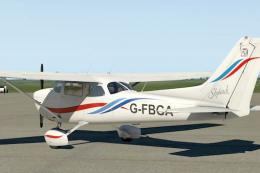
Cessna 172SP Waves (G-FBGA)
This fictitious repaint showcases a distinctive “Waves” design on the default…
Cessna 172SP livery G-SWXE brings a fictional flight academy finish to the default trainer in X-Plane 11, adding crisp logos, clean striping, and purposeful markings that suit circuit work and lesson-style flying. It keeps the stock virtual cockpit and interior look, and requires the default Cessna 172SP.
 Rate
Rate

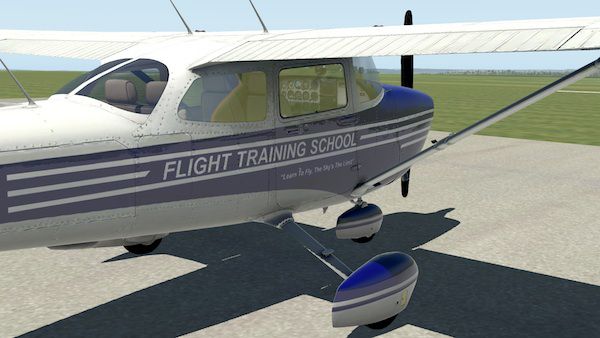
This custom repaint offers a fictional flight academy finish on the default Cessna 172SP in X-Plane 11. It carries the unique tail number G-SWXE and is designed to enhance immersion when simulating flight training operations in a modern general aviation environment. Created by Stuart McGregor, it provides a sleek color scheme that complements the C172’s well-known role in pilot education.
The legendary Cessna 172 has long been used for foundational flight instruction and proficiency development. This repaint captures that spirit by including elements inspired by a made-up training organization. The fuselage lettering and tail markings underscore the aircraft’s classroom-like function, which is perfect for simmers looking to replicate realistic flight lessons within X-Plane 11.

The exterior design features crisp logos and streamlined accents, all intended to reflect a purposeful flight school setting. These details stand out during daylight operations and add character to the aircraft’s profile at various angles on the ramp or during flight. Because this is a repaint for the default Microsoft-inspired Cessna 172 model, cockpit textures and interior elements remain consistent with the base package.
Once installed, the new paint should appear as an option under the aircraft’s livery selection menu. This add-on does not include the base aircraft model; the freeware default Cessna 172SP is required. If you do not have the proper base model, it can be found in the Fly Away Simulation mod library.
All credits for this repaint belong to its creator, Stuart McGregor. His attention to detail in replicating a flight-training-focused theme helps bring the essence of a professional learning environment right into your simulator. This is a free package and exemplifies the collaborative spirit of the flight simulation community, ensuring that enthusiasts can enrich their virtual hangars with fresh, engaging liveries.
Free for all simmers · 6.55 MB · Scanned clean Oct 2026
Download speed: Free tier is capped at 0.5 Mbps (this file takes approximately 2 mins at the cap). PRO members download at full line speed.
{aircraft-folder}/liveries/.readme.txt or README file. It tells you exactly where files go, what dependencies are needed, and any quirks specific to this add-on.The archive flight_training_school.zip has 15 files and directories contained within it.
This list displays the first 500 files in the package. If the package has more, you will need to download it to view them.
| Filename/Directory | File Date | File Size |
|---|---|---|
| flight_training_school | 01.11.17 | 0 B |
| Cessna_172SP_icon11.png | 01.06.17 | 340.97 kB |
| Cessna_172SP_icon11_thumb.png | 01.06.17 | 29.09 kB |
| Thumbs.db | 01.06.17 | 51.00 kB |
| image1.jpg | 01.11.17 | 79.67 kB |
| image2.jpg | 01.11.17 | 71.70 kB |
| objects | 01.06.17 | 0 B |
| Thumbs.db | 01.06.17 | 575.50 kB |
| broken.dds | 01.06.17 | 1.33 MB |
| fuselage.dds | 01.06.17 | 10.67 MB |
| fuselage_LIT.dds | 01.06.17 | 10.67 MB |
| wings.dds | 01.06.17 | 2.67 MB |
| wings_LIT.dds | 01.06.17 | 2.67 MB |
| flyawaysimulation.txt | 10.29.13 | 959 B |
| Go to Fly Away Simulation.url | 01.22.16 | 52 B |
Only PRO members can place votes.
More X-Plane add-ons hand-picked based on this download.
X-Plane Light General Aviation Aircraft
This fictitious repaint showcases a distinctive “Waves” design on the default…
 X-Plane Light General Aviation Aircraft
Another fictitious Scottish Wings livery with tail number G-SWFS for the defa…
 X-Plane Light General Aviation Aircraft
The Beechcraft Bonanza is an American general aviation aircraft introduced in…
 X-Plane Light General Aviation Aircraft
This package includes a highly detailed Mitsubishi MU-2 Solitaire model for X…
 X-Plane Light General Aviation Aircraft
The Grob Tutor 115 E is a single engine two seat side by side training aircra…
 X-Plane Light General Aviation Aircraft
X-Plane 11 Baron B58 With G1000 1.12. This is the default Baron B58 with Garm…
 X-Plane Light General Aviation Aircraft
A high-fidelity rendition of the Piper PA46 Malibu series is now at your fing…
 X-Plane Light General Aviation Aircraft
The Piper M600 is a sleek single turboprop that can cruise up to 30,000 feet …
Be the first to leave a comment on this download.
Be the first to share your thoughts on this download.