


 United States of America
  FSX Scenery
USS Ranger CV-4
USS Ranger CV-4. A static scenery model of the USS Ranger, CV-4. The Ranger w…
Hideaway Ranger Creek (21W) in Washington State turns a quiet strip into a true-to-life bush challenge for FSX, with corrected runway 15 approach obstacles, denser tree lines, and extra ground detail that sharpens visual cues on short final. Built mainly on default textures and requires EZ Scenery library objects for the runway area.
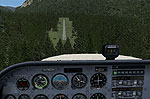
Hideaway Ranger Creek (21W), Washington State (WA). Intended to make the scenery more true to life (therefor more difficutl and dangerous). By Jim Beall. (See also HIDRNGU.ZIP).
Hideaway Ranger Creek Scenery.
This Scenery is a repair to fix some invisible trees at the end of runway 15, My apology for this oversight.
Also added a little more " Eye stimulation" to relieve the " pucker factor " once your safely on the ground. :-)
Please delete Hideaway Ranger Creek if you have it already in your " FSX/Addon Scenery/Scenery Folder and then follow the installation instructions in the " HideAway Ranger Creek text document" included with this download.
Pack your tent and camping gear,fire up the 172,head out to 21W,Come in high to clear the trees at runways ends, Pucker "it" up on approach and don't forget to cross your fingers on takeoff.
This scenery has a " Pucker " factor of 8. :-)
Feed back would be great but don't be too harsh, Im just learning.
Scenery uses primarly your FSX default textures.
Only the runway and surrounding ground cover used objects from EZ Scenery.
( A FREE library available this web site but not necessary to view rest of Ranger Creek Hideaway).
Installation:
Step 1
If you have my 1st " HideAway Ranger Creek"delete that BGL from your FSX/ Addon Scenery/Scenery folder.if not, just go to the next step.
Step 2
Simply copy and paste ( or move ) the Hideaway Ranger Creek BGL file from this download to your Addon Scenery/Scenery folder then fire up your bush plane and watch out for bears.
Free for all simmers · 6.22 KB · Scanned clean Oct 2026
Download speed: Free tier is capped at 0.5 Mbps. PRO members download at full line speed.
FSX\Addon Scenery\ containing scenery and texture sub-folders.readme.txt or README file. It tells you exactly where files go, what dependencies are needed, and any quirks specific to this add-on.Use these coordinates to fly directly to this location once the mod is installed.
47.15420000,-121.53400000
Launch FSX or Prepar3D and use Flights → Load to open the downloaded .pln file. Your aircraft will be positioned at this location.
The archive hidrngu.zip has 7 files and directories contained within it.
This list displays the first 500 files in the package. If the package has more, you will need to download it to view them.
| Filename/Directory | File Date | File Size |
|---|---|---|
| HideAway Ranger Creek | 06.07.07 | 0 B |
| HideAway Ranger Creek 2.bgl | 06.07.07 | 13.73 kB |
| Hideaway Ranger Creek.txt | 06.07.07 | 1.27 kB |
| Please Read First.txt | 06.07.07 | 449 B |
| FILE_ID.DIZ | 06.11.07 | 196 B |
| flyawaysimulation.txt | 10.29.13 | 959 B |
| Go to Fly Away Simulation.url | 01.22.16 | 52 B |
Only PRO members can place votes.
More FSX & P3D add-ons hand-picked based on this download.
FSX Scenery
USS Ranger CV-4. A static scenery model of the USS Ranger, CV-4. The Ranger w…
 FSX Scenery
Ranger 6000 Foot Training Camp, located east of Port Hardy, British Columbia,…
 FSX Scenery
(FAA ID: 3U2), a grass airstrip located in central Idaho (ID) three miles (5 …
 FSX Scenery
(7FL6), Florida (FL), USA. Touted as the world's most famous residential airp…
 FSX Scenery
Sulphur Creek Ranch AIrstrIp, Idaho (ID). MountaIn prIvate aIrstrIp In Idaho.…
 FSX Scenery
This freeware package transforms Ryans Creek Airfield (NZRC) on Stewart Islan…
 FSX Scenery
47 Creek. As seen in episode 2 of "Flying Wild Alaska", made with custom mode…
 FSX Scenery
Mule Creek, British Columbia, Canada (CBS4). Adds ranger station and other fe…
Be the first to leave a comment on this download.
Be the first to share your thoughts on this download.