

 FSX Scenery
Albuquerque International
Albuquerque International Airport (KABQ), New Mexico (NM). This package will …
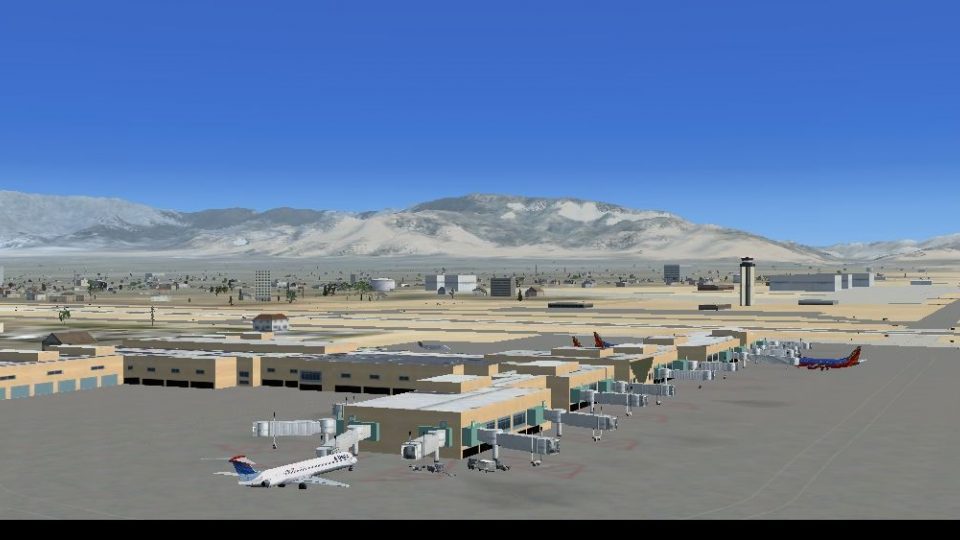
Albuquerque International Sunport (KABQ) scenery refreshes the airport with sharper terminal textures, an updated AFCAD with improved gate and cargo parking, and accurate placement of key structures including runway 8 hangars and the Wyndham Hotel. Built for Microsoft Flight Simulator X, it adds convincing tarmac lighting and uses native jetways; requires FSX_LTS.ZIP.
 Rate
Rate
 United States of America
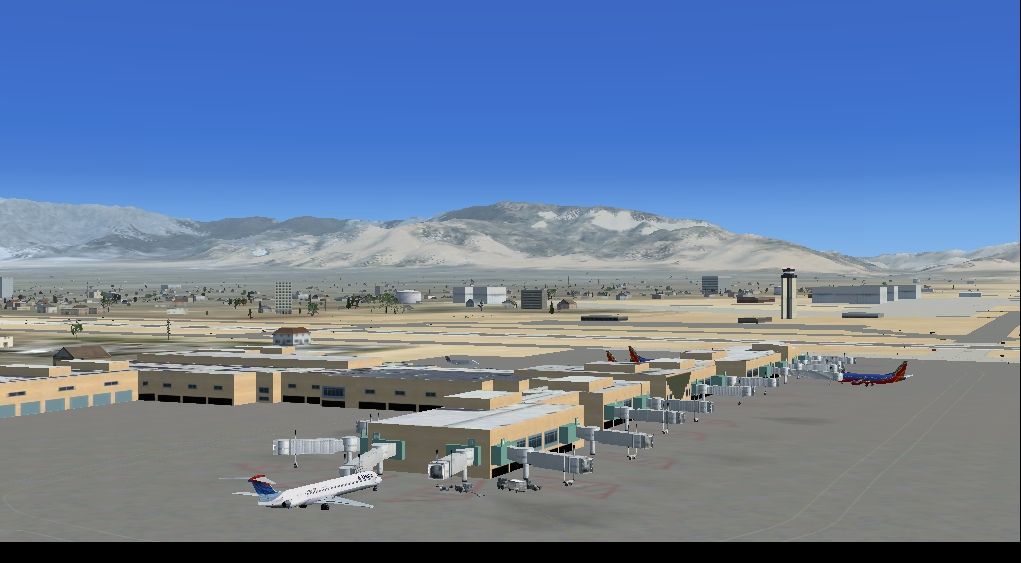
Albuquerque International Airport (KABQ), New Mexico (NM). Updates terminal textures, parking, and adds tarmac lighting. Features a more accurate terminal and uses the FSX jetways. Also includes two large hangars at the end of runway 8 and the Wyndham Hotel. FSX_LTS.ZIP required. Update By Grant G. Original by Kevin Troutman.
-Scenery-fsx1_medium.jpg)
Screenshot of Albuquerque International (KABQ) Scenery.
Original:Kevin Troutman
Update:Grant G.
NOTE: fsx_lts.zip required for tarmac lights!
Released with permission by the original creator: Kevin Troutman
Installation:
1) Copy the KABQ folder into your Addon Scenery folder (probably \Microsoft Flight Simulator X\Addon Scenery).
Go to the Scenery Library in the FSX menu and add KABQ to the libarary.
UPDATE:
Features:
1. A new terminal texture with higher resolution.
2. An up to date AFCAD as of dec 2010.
3. Added Pacific Wings, Lakes Air, and Cargo Parking.
4. Added Tarmac Lights.
Thanks:
For the Tarmac Lights Download- Copyright 2008 by Jim Dhaenens.
ORIGINAL README
Albuquerque International Sunport
for Flight Simulator X
Features:
This scenery includes a more accurate terminal that the default and uses the FSX jetways. The terminal includes all gates except for B2. The construction of the new security screening area has rendered this gate all but useless. There is still a jetway attached to it, but I did not include it here. Included in this scenery are two large hangars at the end of runway 8 that were missing and the Wyndham hotel. The default building was terrible. Also added was the cargo building. I did not add anything to the general aviation area or any of the military areas. I may do that in the future. The proper airlines codes have been added to the proper gates according the the City of Albuquerque webpage. I also updated the landclass around Albuquerque.
Files:
000_excl.bgl - The exclude file that removes the default terminal and wyndham hotel
KABQ.bgl - The updated taxiways and parking
KABQ_Scn.bgl - The buildings
KABQ_LC.bgl - Updated Albuquerque land class
Notes:
The landclass was designed to enhance the default MS landclass. It may be different if a 3rd party landclass is used.
The centerline taxi lights were identified using 2006 air photos available on the Bernalillo County Website. The lights do not appear across the entire field, only in selected spots. I tried to match their location as best as I could.
Thanks:
Russel Dirks for EZ-Landclass V3.0 which was used to create the landclass around Albuquerque
Winfried Orthmann for BglAnalyze
Everyone at fsdeveloper.com. I found answers to most of my questions there.
This scenery has been tested, but I cannot be held responsible for any damage (real or imagined) that results from these files.
This scenery may be freely distrubuted as long as no money is charged for it. It may be incorporated into other packages as long as no money is charged for it and proper credit is given.
Free for all simmers · 1.26 MB · Scanned clean Oct 2026
Download speed: Free tier is capped at 0.5 Mbps. PRO members download at full line speed.
FSX\Addon Scenery\ containing scenery and texture sub-folders.readme.txt or README file. It tells you exactly where files go, what dependencies are needed, and any quirks specific to this add-on.Use these coordinates to fly directly to this location once the mod is installed.
35.04000000,-106.61000000
Launch FSX or Prepar3D and use Flights → Load to open the downloaded .pln file. Your aircraft will be positioned at this location.
The archive kabqxupd.zip has 18 files and directories contained within it.
This list displays the first 500 files in the package. If the package has more, you will need to download it to view them.
| Filename/Directory | File Date | File Size |
|---|---|---|
| Scenery | 11.17.10 | 0 B |
| 000_excl.BGL | 01.28.10 | 172 B |
| KABQ.BGL | 01.03.11 | 51.27 kB |
| KABQ.xml | 01.03.11 | 439.15 kB |
| KABQ_Scn.BGL | 01.28.10 | 170.22 kB |
| KABQLC.bgl | 01.28.10 | 782 B |
| Texture | 01.28.10 | 0 B |
| KABQ1.dds | 11.17.10 | 1.00 MB |
| KABQ1_LM.dds | 11.17.10 | 1.00 MB |
| KABQ1Specular.dds | 11.17.10 | 1.00 MB |
| KABQ2.dds | 01.28.10 | 128.12 kB |
| KABQ2_LM.dds | 01.28.10 | 128.12 kB |
| KABQ2Specular.dds | 01.28.10 | 256.12 kB |
| Readme.txt | 01.10.11 | 2.99 kB |
| thumb.jpg | 01.10.11 | 67.12 kB |
| thumb.jpg | 01.10.11 | 67.12 kB |
| flyawaysimulation.txt | 10.29.13 | 959 B |
| Go to Fly Away Simulation.url | 01.22.16 | 52 B |
Only PRO members can place votes.
More FSX & P3D add-ons hand-picked based on this download.
FSX Scenery
Albuquerque International Airport (KABQ), New Mexico (NM). This package will …
 FSX Scenery
Scenery Albuquerque International Sunport (KABQ), New Mexico (NM), v2, for Ac…
 FSX Scenery
Princess Juliana International Airport (TNCM) in Saint Marteen, Netherlands A…
 FSX Scenery
Barbados International Airport (TBPB). Grantley Adams International Airport f…
 FSX Scenery
Dubai International Airport (OMDB), Dubai. Includes a new passenger terminal …
 FSX Scenery
Soekarno-Hatta International Airport (WIII), Jakarta, Indonesia. An update to…
 FSX Scenery
San Diego International Airport, California (CA), USA. This photoreal scenery…
 FSX Scenery
Suvarnabhumi International Airport (VTBS), Bangkok, Thailand, v1.1. Includes …
Read what other simmers think, or add your own.


Where can I download the fsx_lts.zip referenced in the information for KABQ scenery? AVSim library doesn't seem to have it.
Thank you.
Stew H.