

 FSX Turboprops
FedEx Feeder Cessna C208B
FedEx Feeder Cessna C208B. Textures only for the default Cessna 208 Caravan. …
FedEx Feeder textures for the default Cessna 208B Grand Caravan replicate Canadian airframe C-FEXF with authentic branding while keeping the model’s passenger windows for a clean, believable match. Designed for Microsoft Flight Simulator X, the repaint focuses on exterior detail and requires the original freeware C208B base model.
 Rate
Rate
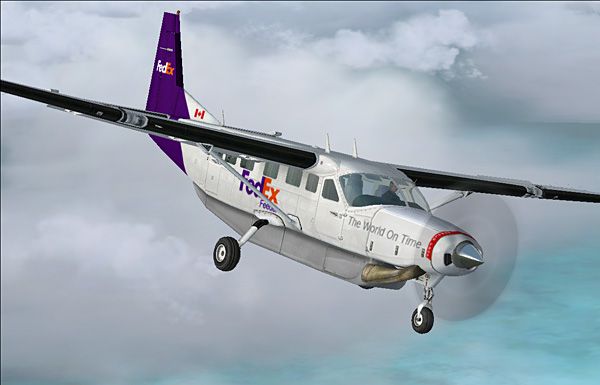

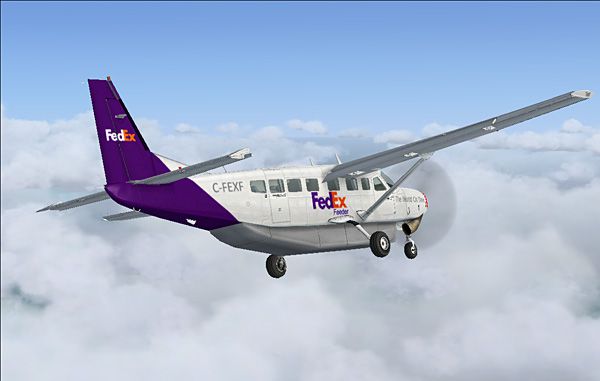
This repaint set offers a specialized texture package depicting a Canadian variant (C-FEXF) of the FedEx Feeder scheme for the default Cessna 208B single-turboprop aircraft. Though FedEx typically uses cargo-only Grand Caravans without passenger windows, this rendition retains the passenger configuration to align with the base model. Created by Amara SokNhep, the files presented here require the original freeware model, which can be accessed through the Fly Away Simulation library.
The Cessna 208B Grand Caravan is widely recognized for its versatility in short-field operations and remote-access capabilities. Powered by a Pratt & Whitney PT6 series turboprop engine, it handles both passenger and cargo duties with ease. In genuine FedEx cargo service, the airframe is configured with a freight-forwarding interior rather than the windowed layout seen here. Nevertheless, this repaint retains the signature FedEx branding, ensuring a unique aesthetic while preserving the functional elements of the original passenger model in Microsoft Flight Simulator X.
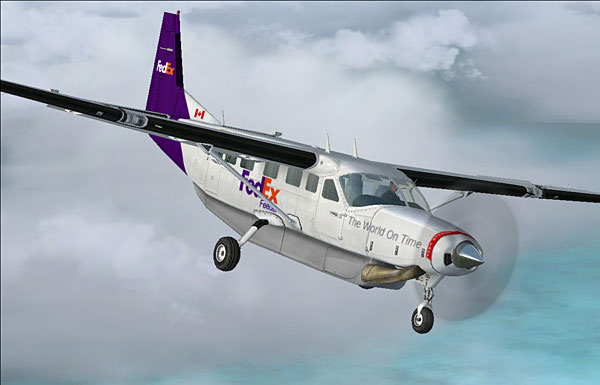
Above: In-flight capture of the custom Canadian feeder livery.
The designer, Amara SokNhep, emphasizes that only the exterior livery is included. This mod is provided free, and permission must be obtained before republishing any part of it. The developer is not responsible for possible technical issues encountered during installation, so always follow safe practices and back up vital files.
To add these textures:
FSX > SimObjects > Airplanes > C208B.x value to the next available position:
[fltsim.x]
title=Cessna Grand Caravan Fedex
sim=Cessna208B
model=
panel=
sound=
texture=fedex
kb_checklists=Cessna208B_Check
kb_reference=Cessna208B_ref
atc_id=
atc_id_color=0xff000000
atc_parking_types=RAMP
ui_manufacturer="Cessna"
ui_type="C208B Grand Caravan"
ui_variation="FedEx Feeder"
ui_typerole="Single Engine TurboProp"
ui_createdby="Microsoft Corporation"
description="Wherever you want to go today, the Cessna Caravan can get you there. First introduced by Cessna in 1985, the Caravan was designed to land nearly anywhere, on land or water. Undoubtedly, it has lived up to its creators' intentions. Whether supplies need to be brought to a flooded village in the mountains of Peru(flooded mountains??), an injured person needs to be flown out from a remote lake in Alaska(dont forget to attach some sort of flotation device before flying "into" the lake, i miss that amphibian caravan in fs9), or an archeologist wants access to a tiny site in the African desert, the Caravan has what's needed to do the job."
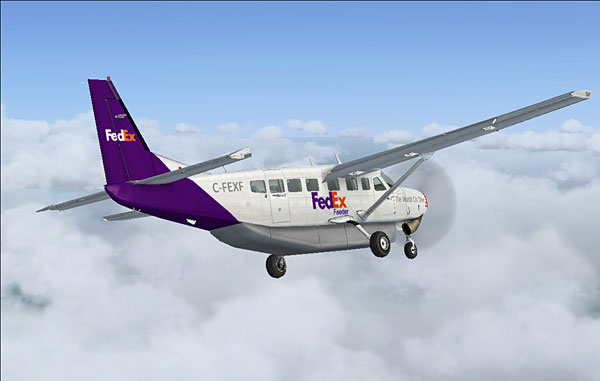
Above: Another angle showcasing the exterior detailing in flight.
By employing flight simulator functionality, you can simulate short-runway cargo missions or passenger charters under the recognizable FedEx look. Notably, the original crew door and cabin windows remain visible due to the base model’s design. This texture package serves those seeking an alternative livery while retaining standard passenger cabin elements. Ensure that your Microsoft Flight Simulator X installation is functional, and always verify correct entry of texture data in the configuration file. Enjoy exploring the unique blend of commercial cargo styling on an otherwise passenger-oriented aircraft.
Free for all simmers · 657.73 KB · Scanned clean Oct 2026
Download speed: Free tier is capped at 0.5 Mbps. PRO members download at full line speed.
texture.{airline}) inside FSX\SimObjects\Airplanes\{base-aircraft}\.aircraft.cfg in Notepad. Add a new [fltsim.X] section per the readme.readme.txt or README file. It tells you exactly where files go, what dependencies are needed, and any quirks specific to this add-on.The archive c208fedx.zip has 12 files and directories contained within it.
This list displays the first 500 files in the package. If the package has more, you will need to download it to view them.
| Filename/Directory | File Date | File Size |
|---|---|---|
| texture.fedex | 02.03.08 | 0 B |
| C208_T.dds | 02.03.08 | 1.00 MB |
| texture.cfg | 08.14.06 | 137 B |
| thumbnail.jpg | 02.03.08 | 5.20 kB |
| Thumbs.db | 02.03.08 | 8.00 kB |
| fedex01.jpg | 02.03.08 | 74.77 kB |
| fedex02.jpg | 02.03.08 | 79.31 kB |
| fedex03.jpg | 02.03.08 | 82.33 kB |
| Readme.txt | 02.04.08 | 2.95 kB |
| c208fedex.gif | 02.04.08 | 10.03 kB |
| flyawaysimulation.txt | 10.29.13 | 959 B |
| Go to Fly Away Simulation.url | 01.22.16 | 52 B |
Only PRO members can place votes.
More FSX & P3D add-ons hand-picked based on this download.
FSX Turboprops
FedEx Feeder Cessna C208B. Textures only for the default Cessna 208 Caravan. …
 FSX Turboprops
FedEx Cessna 208B Grand Caravan. A repaint by Bashir Ismail of the default Ce…
 FSX Turboprops
This is a real world Era Alaska livery for the default Grand Caravan, based o…
 FSX Turboprops
Experience a detailed DHL-themed paint scheme for the default Cessna 208B Gra…
 FSX Turboprops
This is one of the original aircraft flown on the Discovery Channel show, "Fl…
 FSX Turboprops
Textures only for the default C208B. Repaint by Mike Lanza. Screenshot of Red…
 FSX Turboprops
SafariLink Cessna 208B Grand Caravan. This repaint by Bashir Ismail of the de…
 FSX Turboprops
Sete Linhas Aereas Cessna Grand Caravan, registration PT-MEG. Sete Linhas Aer…
Read what other simmers think, or add your own.
