

 FSX Scenery
Miami International Airport
Scenery Miami International Airport (KMIA), Florida (FL). Includes updated ta…
Miami International Airport (KMIA) receives a focused refresh for FSX, updating taxiways, terminals, gates, and signage for smoother ground operations. Crosswind runways, assigned parking, extra fuel trucks, and added airport objects enhance traffic flow and situational awareness, bringing the default scenery closer to a busy modern hub.
 Rate
Rate
 United States of America
Miami International Airport, Florida (FL), USA. Update for the default KMIA. Created and edited with ADEX. Includes crosswind runways and objects. By Jake Benitez.
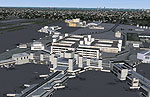
Aerial view of Miami International Airport.
This is an update to the default Miami International Airport for FSX using ADEX. It includes:
Included are two files:
Free for all simmers · 3.13 MB · Scanned clean Oct 2026
Download speed: Free tier is capped at 0.5 Mbps. PRO members download at full line speed.
FSX\Addon Scenery\ containing scenery and texture sub-folders.readme.txt or README file. It tells you exactly where files go, what dependencies are needed, and any quirks specific to this add-on.Use these coordinates to fly directly to this location once the mod is installed.
25.79540000,-80.29010000
Launch FSX or Prepar3D and use Flights → Load to open the downloaded .pln file. Your aircraft will be positioned at this location.
The archive kmia_v1_0_ade_jb_fsx.zip has 9 files and directories contained within it.
This list displays the first 500 files in the package. If the package has more, you will need to download it to view them.
| Filename/Directory | File Date | File Size |
|---|---|---|
| FILE_ID.DIZ.txt | 02.02.13 | 152 B |
| KMIA.BMP | 02.03.13 | 3.08 MB |
| KMIA_ADEX_JB.BGL | 02.02.13 | 181.62 kB |
| KMIA_ADEX_JB_OBJ.BGL | 02.02.13 | 34.14 kB |
| KMIA2.BMP | 02.03.13 | 3.08 MB |
| KMIA3.BMP | 02.03.13 | 3.08 MB |
| README!! IMPORTANT.txt | 02.03.13 | 1.96 kB |
| flyawaysimulation.txt | 10.29.13 | 959 B |
| Go to Fly Away Simulation.url | 01.22.16 | 52 B |
Only PRO members can place votes.
More FSX & P3D add-ons hand-picked based on this download.
FSX Scenery
Scenery Miami International Airport (KMIA), Florida (FL). Includes updated ta…
 FSX Scenery
Princess Juliana International Airport (TNCM) in Saint Marteen, Netherlands A…
 FSX Scenery
Barbados International Airport (TBPB). Grantley Adams International Airport f…
 FSX Scenery
Dubai International Airport (OMDB), Dubai. Includes a new passenger terminal …
 FSX Scenery
Soekarno-Hatta International Airport (WIII), Jakarta, Indonesia. An update to…
 FSX Scenery
San Diego International Airport, California (CA), USA. This photoreal scenery…
 FSX Scenery
Suvarnabhumi International Airport (VTBS), Bangkok, Thailand, v1.1. Includes …
 FSX Scenery
Scenery Abu Dhabi International Airport (OMAA), Abu Dhabi, United Arab Emirat…
Read what other simmers think, or add your own.

Why are there two ATC towers standing? Is this an error?
The white tall tower is the main FSX one. The other is a light-brown, medium-height tower. I will show you a screenshot.