

 FSX Civil Aircraft
Lusitaniair Airlines Airbus A320 CS-TVO
Immerse yourself in an authentic short-to-medium range flying environment wit…
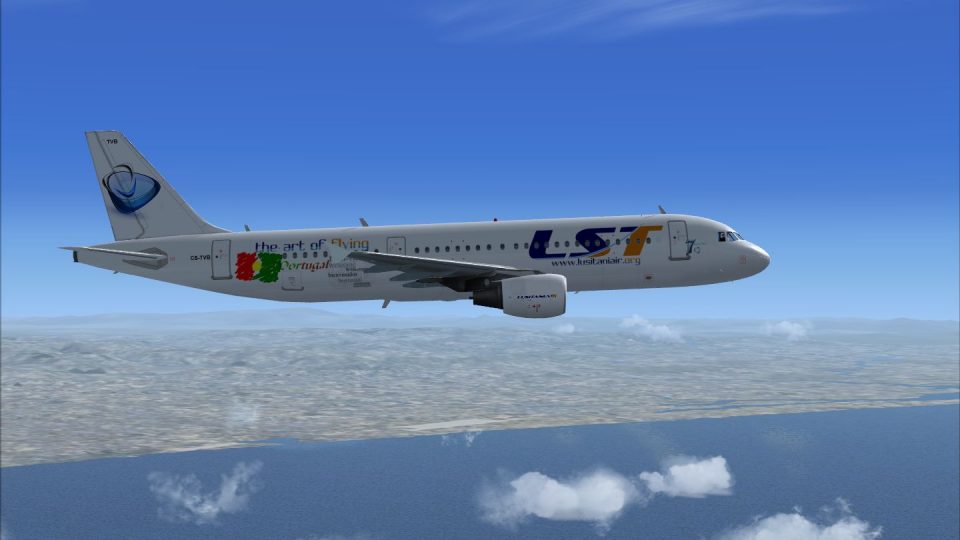
Lusitaniair Airlines Airbus A320 CS-TVB brings a convincing European Connect look to your AI or scheduled routes in Microsoft Flight Simulator X, with crisp fuselage markings, tail artwork, and extra detail around the engine nacelles for a more authentic ramp presence. Requires the payware Wilco/FeelThere Airbus Series Volume 1 model.
 Rate
Rate

This specialized repaint delivers the Lusitaniair Airlines Airbus A320, identified as CS-TVB, for avid sim pilots who want to incorporate a realistic European Connect livery into Microsoft Flight Simulator X. With its short-to-medium-range design, the Airbus A320 family has long been recognized for its efficient operations and comfortable cabin experience, making it a popular choice among carriers across Europe. This livery, meticulously created by Joao Paulino, requires the payware Wilco/FeelThere Airbus Series Volume 1 add-on (available separately at places such as our payware store, SimShack).
Lusitaniair Airlines is depicted as a modern regional operator in this repaint, focusing on continental routes with the Airbus A320. The actual aircraft registration CS-TVB highlights a unique identifier within the fictional fleet. This approach helps immerse enthusiasts in a more authentic environment when simulating European carrier operations.
Developed for pilots who value authenticity, this livery features refined texturing on the fuselage and stabilizers, plus added detailing around the engine nacelles. Visual clarity provided in this repaint extends to the airline markings, matching the look and feel expected from real-world counterparts. A typical Airbus A320 flight deck benefits from these high-quality textures by enhancing the overall immersion.

Screenshot of Lusitaniair Airlines Airbus A320 in flight.
Microsoft Flight Simulator X\SimObjects\Airplanes\feelThere PIC A320.[fltsim.X]
title=Feelthere A320 CFM European Connect CS-TVB
sim=FeelThere_A320CFM
sound=
model=
texture=CS-TVB
atc_airline=AIRBUS
panel=
checklists=
atc_id=CS-TVB
atc_flight_number=320
atc_heavy=0
ui_manufacturer=Frota Lusitaniair
ui_type=Airbus A320 CFM - Wilco
ui_variation=European Connect CS-TVB
ui_typerole="Commercial Airliner"
ui_createdby="feelThere/Wilco"
visual_damage=1
description=
Once installed, you will see the Lusitaniair Airlines Airbus A320 in your aircraft menu, ready for flight operations. This repaint provides its textures only, so ensure you own the required Wilco/FeelThere payware before installation.
Enjoy your next journey across Europe with this custom livery, and experience the synergy of realistic airline branding blended with the renowned Airbus A320 design. Created by Joao Paulino, this add-on aims to enrich your Microsoft Flight Simulator X environment.
Free for all simmers · 12.24 MB · Scanned clean Oct 2026
Download speed: Free tier is capped at 0.5 Mbps (this file takes approximately 3 mins at the cap). PRO members download at full line speed.
texture.{airline}) inside FSX\SimObjects\Airplanes\{base-aircraft}\.aircraft.cfg in Notepad. Add a new [fltsim.X] section per the readme.readme.txt or README file. It tells you exactly where files go, what dependencies are needed, and any quirks specific to this add-on.The archive cs-tvb_a320_european_fsx_wilco.zip has 48 files and directories contained within it.
This list displays the first 500 files in the package. If the package has more, you will need to download it to view them.
| Filename/Directory | File Date | File Size |
|---|---|---|
| cs-tvb_a320_european_fsx_wilco | 11.16.12 | 0 B |
| CS-TVB.jpg | 11.16.12 | 517.88 kB |
| Readme.txt | 11.16.12 | 1.10 kB |
| Texture.CS-TVB | 11.16.12 | 0 B |
| A320_ENGINE_L.bmp | 12.02.06 | 1.00 MB |
| A320_ENGINE_T.bmp | 12.08.09 | 1.00 MB |
| A320_Main1_L.bmp | 12.02.06 | 1.00 MB |
| A320_Main1_t.bmp | 11.16.12 | 5.33 MB |
| A320_Main2_L.bmp | 12.02.06 | 1.00 MB |
| A320_Main2_t.bmp | 11.16.12 | 5.33 MB |
| A320_Main3_L.bmp | 12.02.06 | 1.00 MB |
| A320_Main3_t.bmp | 11.16.12 | 5.33 MB |
| A320_Various2_L.bmp | 01.27.07 | 4.00 MB |
| A320_Various2_t.bmp | 12.12.10 | 1.00 MB |
| A320_Various3_L.bmp | 12.02.06 | 64.07 kB |
| A320_Various3_t.bmp | 12.07.06 | 64.07 kB |
| A320_Various_L.bmp | 12.02.06 | 256.07 kB |
| A320_Various_t.bmp | 12.02.06 | 256.07 kB |
| A320_Wing1_L.bmp | 12.02.06 | 1.00 MB |
| A320_Wing1_t.bmp | 05.05.10 | 1.00 MB |
| A320_Wing2_L.bmp | 12.02.06 | 1.00 MB |
| A320_Wing2_t.bmp | 01.10.07 | 4.00 MB |
| cockp1_2_L.bmp | 12.02.06 | 4.00 MB |
| cockp1_2_T.bmp | 12.02.06 | 1.00 MB |
| cockp1_L.bmp | 02.01.07 | 1.00 MB |
| cockp1_T.bmp | 02.01.07 | 1.00 MB |
| cockp2_L.bmp | 01.27.07 | 1.00 MB |
| cockp2_T.bmp | 12.07.06 | 1.00 MB |
| cockp3_L.bmp | 01.27.07 | 1.00 MB |
| cockp3_T.bmp | 12.19.06 | 1.00 MB |
| cockp4_L.bmp | 02.01.07 | 1.00 MB |
| cockp4_T.bmp | 02.01.07 | 1.00 MB |
| cockp5_L.bmp | 01.27.07 | 1.00 MB |
| cockp5_T.bmp | 12.19.06 | 1.00 MB |
| cockp_mirr_L.bmp | 01.27.07 | 256.07 kB |
| cockp_mirr_T.bmp | 01.02.07 | 256.07 kB |
| interior_L.bmp | 01.27.07 | 4.00 MB |
| interior_T.bmp | 01.10.07 | 4.00 MB |
| misc_L.bmp | 01.27.07 | 1.00 MB |
| misc_T.bmp | 01.25.07 | 256.07 kB |
| panel01_L.bmp | 11.24.05 | 16.07 kB |
| panel_L.bmp | 01.27.07 | 256.07 kB |
| panel_T.bmp | 12.02.06 | 256.07 kB |
| seat1_L.bmp | 01.27.07 | 256.07 kB |
| seat1_T.bmp | 12.19.06 | 256.07 kB |
| thumbnail.jpg | 11.16.12 | 33.23 kB |
| flyawaysimulation.txt | 10.29.13 | 959 B |
| Go to Fly Away Simulation.url | 01.22.16 | 52 B |
Only PRO members can place votes.
More FSX & P3D add-ons hand-picked based on this download.
FSX Civil Aircraft
Immerse yourself in an authentic short-to-medium range flying environment wit…
 FSX Civil Aircraft
This repaint showcases Lusitaniair Airlines’ Airbus A319 (registration CS-TVF…
 FSX Civil Aircraft
Lusitaniair Airlines’ Airbus A319 (CS-TSJ) brings a distinctive European conn…
 FSX Civil Aircraft
This freeware release adds a meticulously crafted Lusitaniair-inspired Airbus…
 FSX Civil Aircraft
This freeware package features a bespoke Lusitaniair Airlines Airbus A330-200…
 FSX Civil Aircraft
Explore a distinctive livery for an Airbus A340-300 operated by Lusitaniair A…
 FSX Civil Aircraft
This repaint package introduces a distinctive Lusitaniair Airlines Airbus A33…
 FSX Civil Aircraft
Lusitaniair Airlines CS-TVU paint for LST Smile Express fleet. Textures only.…
Be the first to leave a comment on this download.
Be the first to share your thoughts on this download.