

 FSX Civil Aircraft
Bahamasair Boeing 737-200 ADV
This freeware repaint showcases two specific Bahamasair registrations—C6-BFW …
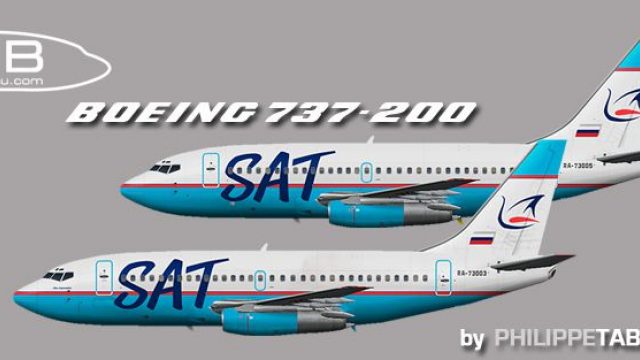
SAT Boeing 737-200 Advanced repaint pack brings two authentic registrations, RA-73003 “Ivan Kuropatko” and RA-73005, with crisp markings and period-correct color fidelity for classic short- to medium-haul operations in FSX. Designed for AI traffic and flightplan matching, it requires the freeware FAIB 737-200 base model by Philippe Tabatchnik.
 Rate
Rate
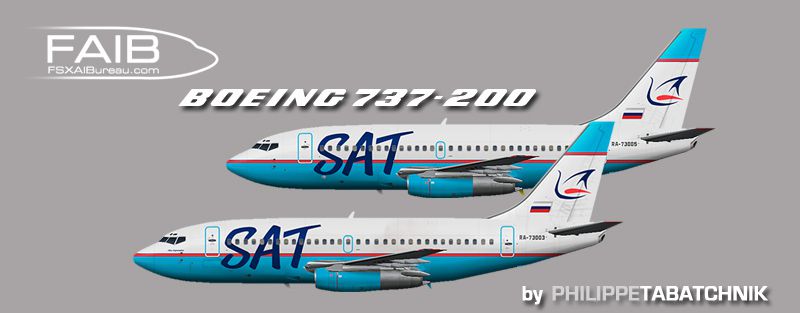
This specialized repaint offers two distinct registrations—RA-73003 “Ivan Kuropatko” and RA-73005—for the classic 737-200 Advanced series, intended for use with the freeware FAIB base model by Philippe Tabatchnik. This repaint adds significant visual authenticity for pilots who enjoy simulating short- to medium-haul routes in a venerable workhorse known for efficient operations and rugged performance across various environments.
Authentic Liveries: Both tail numbers (RA-73003 and RA-73005) are presented with careful attention to exterior markings, color fidelity, and registration details. Real-world operators frequently utilized the 737-200 ADV (short for Advanced) for its enhanced powerplants and improved fuel capacity, which are visually interpreted through the subtle details in this repaint.
Developed by Experts: The foundation of this package relies on the FAIB_B7372.ZIP files created by Philippe Tabatchnik, ensuring that the geometry and flight model remain of high quality. The repainter, who meticulously crafted these SAT textures, designed them for seamless integration with flight plans and traffic schedules.

Side view showcasing the SAT Boeing 737-200 ADV livery.
The 737-200 Advanced represents a refined generation of the original 737-200, offering better payload range and performance upgrades. Many carriers worldwide continue to employ this version in rugged or remote dynamics, citing reliability and manageable operating costs. SAT’s adaptation underscores these traits, especially for regional hops where robust handling is crucial.
texture.sat ra-xxx folder (matching your particular preference of registration) into the appropriate base model directory specified in the fltsim.txt file. Make sure you have acquired the necessary base package from the Fly Away Simulation mod library beforehand.[fltsim.x] entries. Combine them sequentially with existing liveries: [fltsim.0], [fltsim.1], and so on, ensuring that each section contains a unique numerical value without duplication or omission.Once the repaint is implemented, the SAT Boeing 737-200 ADV blends into the simulated skies, capturing the character of the real aircraft and reflecting a storied heritage of reliable, short-haul travel.
Free for all simmers · 1.61 MB · Scanned clean Oct 2026
Download speed: Free tier is capped at 0.5 Mbps. PRO members download at full line speed.
This file is a repaint — the package below is the base model it paints onto. Install it first, or the textures will have nothing to load onto.
texture.{airline}) inside FSX\SimObjects\Airplanes\{base-aircraft}\.aircraft.cfg in Notepad. Add a new [fltsim.X] section per the readme.readme.txt or README file. It tells you exactly where files go, what dependencies are needed, and any quirks specific to this add-on.The archive faib_732_shu_fsx.zip has 10 files and directories contained within it.
This list displays the first 500 files in the package. If the package has more, you will need to download it to view them.
| Filename/Directory | File Date | File Size |
|---|---|---|
| ReadMe.txt | 04.03.12 | 3.38 kB |
| FAIB_737_200_L.bmp | 04.01.12 | 4.00 MB |
| FAIB_737_200_T.bmp | 04.01.12 | 4.00 MB |
| FAIB_737_200_L.bmp | 04.01.12 | 4.00 MB |
| FAIB_737_200_T.bmp | 04.01.12 | 4.00 MB |
| faib_732_SAT_fleet.gif | 04.03.12 | 4.50 kB |
| faib_732_SAT_fleet.jpg | 04.03.12 | 93.48 kB |
| fltsim.txt | 04.03.12 | 738 B |
| flyawaysimulation.txt | 10.29.13 | 959 B |
| Go to Fly Away Simulation.url | 01.22.16 | 52 B |
Only PRO members can place votes.
More FSX & P3D add-ons hand-picked based on this download.
FSX Civil Aircraft
This freeware repaint showcases two specific Bahamasair registrations—C6-BFW …
 FSX Civil Aircraft
This package offers a detailed Rutaca Boeing 737-200 Advanced repaint set. It…
 FSX Civil Aircraft
This freeware repaint features the Estelar Latinoamerica Boeing 737-200 ADV i…
 FSX Civil Aircraft
This freeware enhancement adds a faithful Sriwijaya Boeing 737-200 ADV repain…
 FSX Civil Aircraft
This is a repaint of Captain Sim's excellent B737-200ADV. These textures repr…
 FSX Civil Aircraft
This repaint offers an immersive representation of Merpati Nusantara Airlines…
 FSX Civil Aircraft
This freeware release features a detailed repaint of the Boeing 737-200 ADV i…
 FSX Civil Aircraft
This freeware repaint brings the distinctive Avior Airlines color scheme to t…
Be the first to leave a comment on this download.
Be the first to share your thoughts on this download.