

 FSX Scenery
Princess Juliana International Airport
Princess Juliana International Airport (TNCM) in Saint Marteen, Netherlands A…
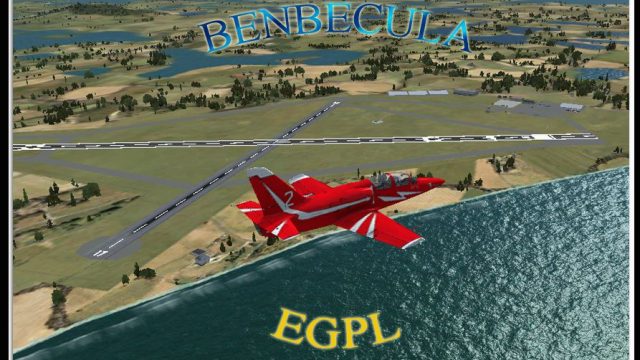
Benbecula Airport (EGPL/BEB) scenery brings the Outer Hebrides to life in FSX with an accurate rural airfield layout and positioning on the island of Benbecula. It suits scheduled island hops, mainland links, and realistic emergency or range-support operations, reflecting the airport’s role for Benbecula, North Uist, and South Uist.
 Rate
Rate
 United Kingdom

Scenery Benbecula Airport (IATA: BEB, ICAO: EGPL), UK. Located on the island of Benbecula in the Outer Hebrides, off the West Coast of Scotland. It is a small rural airport owned and maintained by Highlands and Islands Airports Limited. By Gordon Barnes.
Benbecula Airport Scenery.
The airport provides scheduled services to the Scottish mainland and other Hebridean islands. In so doing it provides vital transport connections for the islands of Benbecula, North Uist and South Uist, which are interlinked by causeway but are over two hours from the mainland by sea. The airport is also used by emergency air ambulance flights, and by flights supporting the nearby missile test range.
Benbecula (Scottish Gaelic: Beinn nam Fadhla,is an island of the Outer Hebrides in the Atlantic Ocean off the west coast of Scotland. In the 2001 census it had a usually resident population of 1,249, the majority of which are Roman Catholic. It forms part of the area administered by Comhairle nan Eilean Siar or the Western Isles Council.
Installation Instructions:
Just place the EGPL_ADEX_GB.BGL file into the Addon Scenery folder, within the Scenery folder.
eg.
c:\Games\FSX\Addon Scenery\Scenery.
G Barnes
UK.
Free for all simmers · 588.45 KB · Scanned clean Oct 2026
Download speed: Free tier is capped at 0.5 Mbps. PRO members download at full line speed.
FSX\Addon Scenery\ containing scenery and texture sub-folders.readme.txt or README file. It tells you exactly where files go, what dependencies are needed, and any quirks specific to this add-on.Use these coordinates to fly directly to this location once the mod is installed.
57.48110000,-7.36220000
Launch FSX or Prepar3D and use Flights → Load to open the downloaded .pln file. Your aircraft will be positioned at this location.
The archive benbeculaegpl.zip has 6 files and directories contained within it.
This list displays the first 500 files in the package. If the package has more, you will need to download it to view them.
| Filename/Directory | File Date | File Size |
|---|---|---|
| Benbecula EGPL | 03.26.10 | 0 B |
| Benbecula.jpg | 03.26.10 | 600.57 kB |
| EGPL_ADEX_GB.BGL | 03.26.10 | 14.02 kB |
| ReadMe.txt | 03.26.10 | 1.49 kB |
| flyawaysimulation.txt | 10.29.13 | 959 B |
| Go to Fly Away Simulation.url | 01.22.16 | 52 B |
Only PRO members can place votes.
More FSX & P3D add-ons hand-picked based on this download.
FSX Scenery
Princess Juliana International Airport (TNCM) in Saint Marteen, Netherlands A…
 FSX Scenery
Los Angeles Airport Scenery v3, California (CA). This photoreal scenery is a …
 FSX Scenery
Barbados International Airport (TBPB). Grantley Adams International Airport f…
 FSX Scenery
Paris Charles de Gaulle Airport (CDG, LFPG), France. The entire airport has b…
 FSX Scenery
John F. Kennedy Airport (KJFK), New York, NYU. This is a photoreal scenery re…
 FSX Scenery
Dubai International Airport (OMDB), Dubai. Includes a new passenger terminal …
 FSX Scenery
Soekarno-Hatta International Airport (WIII), Jakarta, Indonesia. An update to…
 FSX Scenery
San Diego International Airport, California (CA), USA. This photoreal scenery…
Be the first to leave a comment on this download.
Be the first to share your thoughts on this download.