

 FSX Scenery
NL2000 V4.03 Hoogeveen Airport
Upgrade your virtual flights over the Dutch skies with an enhanced rendition …
Hoogeveen Airport (EHHO) receives a detailed NL2000 v4.0 scenery upgrade with refined ground textures, accurate runway and taxiway layout, custom buildings and hangars, and VFR-friendly local objects that sharpen visual approaches. Designed for Microsoft Flight Simulator X, it requires the NL2000 v4 installer for seamless modular integration across the Netherlands.
 Rate
Rate
 Netherlands
This freeware release enhances Hoogeveen Airport (EHHO) in exquisite detail, offering a modular scenery update designed for use with the NL2000 v4 platform in Microsoft Flight Simulator X. It brings more realistic ground textures, meticulous building designs, and an overall refined environment that enriches virtual flying over the Netherlands. Developed by The Netherlands 2000 Scenery Design Team, this comprehensive package focuses on adding accuracy to runway elements, handling areas, and surrounding features at Hoogeveen.
In order to integrate the Hoogeveen Airport scenery seamlessly, users must have the NL2000 v4 installer. This modular setup streamlines how scenery files are added and updated. Once the official installer is running, select and install the EHHO scenery package so it merges with the broader Netherlands coverage offered by NL2000 v4.
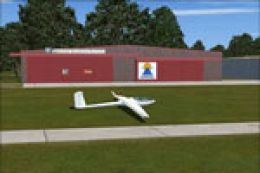
While the heart of this add-on focuses on the runway infrastructure, equal attention is paid to surrounding farmland, roads, and other local features. This subtle refinement helps adapt the environment for general aviation flights while delivering an authentic simulation of Hoogeveen’s atmosphere. The developers meticulously shaped elements like fences and approach lighting for a truly immersive environment.
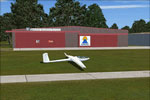
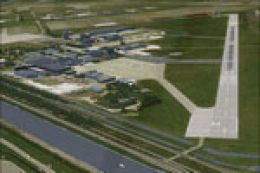
NL2000 V4.0 Hoogeveen Airport Scenery.
The layout of Hoogeveen (including grassy areas) has been crafted to ensure realistic touchdown points and safe taxi paths. Pilots who enjoy short-field landings will appreciate the nuanced surface textures. Moreover, the updated building models offer sufficient landmarks for pattern work, making visual approaches more intuitive in the FSX environment.
The NL2000 series is a modular collection that covers the Netherlands with high-precision scenery. Complete sets for major airports and regions are available, augmenting the overall experience by delivering consistent quality across the entire country. This Hoogeveen pack integrates effortlessly with other modules, ensuring a cohesive representation of Dutch landscapes.
Created with precision by The Netherlands 2000 Scenery Design Team, this add-on elevates the EHHO experience for virtual aviators looking for fidelity in their flight simulation environment. The project is free yet aims to match detailed payware expansions, making it a worthwhile addition to any Dutch flight adventure.
Free for all simmers · 22.53 MB · Scanned clean Oct 2026
Download speed: Free tier is capped at 0.5 Mbps (this file takes approximately 6 mins at the cap). PRO members download at full line speed.
FSX\Addon Scenery\ containing scenery and texture sub-folders.readme.txt or README file. It tells you exactly where files go, what dependencies are needed, and any quirks specific to this add-on.Use these coordinates to fly directly to this location once the mod is installed.
52.73000000,6.51600000
Launch FSX or Prepar3D and use Flights → Load to open the downloaded .pln file. Your aircraft will be positioned at this location.
The archive nl2k_v4_ehho.zip has 8 files and directories contained within it.
This list displays the first 500 files in the package. If the package has more, you will need to download it to view them.
| Filename/Directory | File Date | File Size |
|---|---|---|
| nl2k_v4_ehho.gif | 05.24.10 | 9.94 kB |
| FILE_ID.DIZ | 05.24.10 | 353 B |
| nl2k_v4_ehho.nl2 | 04.30.10 | 22.53 MB |
| nl2k_v4_ehho.txt | 05.22.10 | 345 B |
| copyright.txt | 05.24.10 | 4.43 kB |
| auteursrecht.txt | 05.24.10 | 5.06 kB |
| flyawaysimulation.txt | 10.29.13 | 959 B |
| Go to Fly Away Simulation.url | 01.22.16 | 52 B |
Only PRO members can place votes.
More FSX & P3D add-ons hand-picked based on this download.
FSX Scenery
Upgrade your virtual flights over the Dutch skies with an enhanced rendition …
 FSX Scenery
Enhance your simulator’s portrayal of one of the Netherlands’ busiest regiona…
 FSX Scenery
This comprehensive scenery package brings an authentic representation of Eind…
 FSX Scenery
This free add-on offers a precisely modeled depiction of EHEH Eindhoven Airpo…
 FSX Scenery
This comprehensive package brings an updated rendition of Maastricht Aachen A…
 FSX Scenery
Enhance your virtual journey in FSX by adding a meticulously detailed renditi…
 FSX Scenery
This airport enhancement transforms Groningen Airport Eelde (EHGG) within Mic…
 FSX Scenery
Experience the intricacies of Den Helder Airport (EHKD) with this free FSX sc…
Be the first to leave a comment on this download.
Be the first to share your thoughts on this download.