


 United States of America
  FSX Scenery
Princess Juliana International Airport
Princess Juliana International Airport (TNCM) in Saint Marteen, Netherlands A…
Kutztown Airport (N31) scenery brings the recently closed Pennsylvania field back to life in FSX, recreating the airfield atmosphere and its well-known fly-in diner destination for nostalgic regional GA flying. The package places the airport and surrounding details cleanly, and may require common scenery object libraries such as EZ-Scenery for full object coverage.
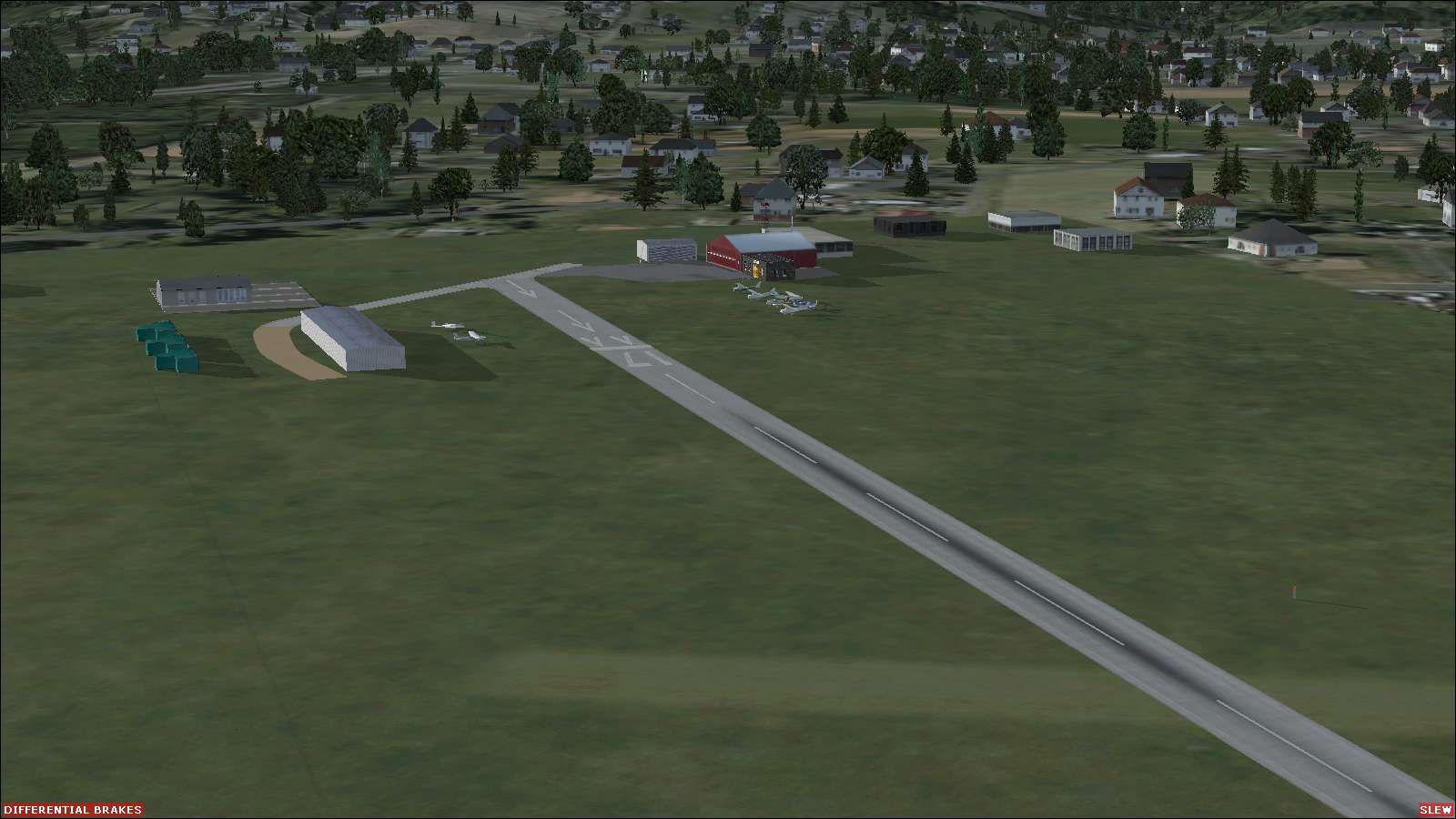
Scenery Kutztown Airport (N31), Pennsylvania (PA). Kutztown Airport was closed recently. Here is another attempt to revive closed airports in the US. Kutztown Airport was home to one of the best fly-in diners in southeast Pennsylvania. By John "Sharkey" Hawranick, Jr.
Kutztown Airport Scenery.
Kutztown Airport (N31), PA was closed recently. Here is another attempt to revive closed airports in the US. Kutztown Airport was home to one of the best Fly-in diners in southeast Pennsylvania.
A couple years back, I ran into a website called "Abandoned and Little Known Airfields" by Paul Freeman. There I saw airports that I had not seen in many years. In some cases, I had only seen their ruins. It inspired me to create these airports in FS. This site has become my inspiration and reference "jumping off" point in a lot of my designs.
INSTALLATION:
All files go into /Addon Scenery/Scenery.
ISSUES:
None I'm aware of. You may need a library (usually EZ-Scenery) if something does not appear... but how would you know, since it's not there.
AS ALWAYS:
I hope you enjoy this as much as I. I welcome CONSTRUCTIVE criticism and help. I do this as a hobby and, as such, charge nothing. If satisfied, drop me a line. If dissatisfied, let me know and feel free to delete it or dive-bomb on it.
Acknowledgements:
Paul Freeman - for his extraordinary opus.
The creators and publishers of Instant Scenery and AFX.
The many who have created libraries for scenery programs.
Google earth and Terraserver-USA.
Yours in simming,
John "Sharkey" Hawranick, Jr.
Free for all simmers · 114.62 KB · Scanned clean Oct 2026
Download speed: Free tier is capped at 0.5 Mbps. PRO members download at full line speed.
FSX\Addon Scenery\ containing scenery and texture sub-folders.readme.txt or README file. It tells you exactly where files go, what dependencies are needed, and any quirks specific to this add-on.Use these coordinates to fly directly to this location once the mod is installed.
40.58330000,-75.76670000
Launch FSX or Prepar3D and use Flights → Load to open the downloaded .pln file. Your aircraft will be positioned at this location.
The archive kutztown_fsx.zip has 7 files and directories contained within it.
This list displays the first 500 files in the package. If the package has more, you will need to download it to view them.
| Filename/Directory | File Date | File Size |
|---|---|---|
| AFX_N31.bgl | 07.04.10 | 4.64 kB |
| N31_EZ.bgl | 07.01.10 | 716 B |
| N31.BGL | 07.02.10 | 138 B |
| n31.txt | 07.05.10 | 1.67 kB |
| screenshot3.jpg | 07.05.10 | 112.64 kB |
| flyawaysimulation.txt | 10.29.13 | 959 B |
| Go to Fly Away Simulation.url | 01.22.16 | 52 B |
Only PRO members can place votes.
More FSX & P3D add-ons hand-picked based on this download.
FSX Scenery
Princess Juliana International Airport (TNCM) in Saint Marteen, Netherlands A…
 FSX Scenery
Los Angeles Airport Scenery v3, California (CA). This photoreal scenery is a …
 FSX Scenery
Barbados International Airport (TBPB). Grantley Adams International Airport f…
 FSX Scenery
Paris Charles de Gaulle Airport (CDG, LFPG), France. The entire airport has b…
 FSX Scenery
John F. Kennedy Airport (KJFK), New York, NYU. This is a photoreal scenery re…
 FSX Scenery
Dubai International Airport (OMDB), Dubai. Includes a new passenger terminal …
 FSX Scenery
Soekarno-Hatta International Airport (WIII), Jakarta, Indonesia. An update to…
 FSX Scenery
San Diego International Airport, California (CA), USA. This photoreal scenery…
Be the first to leave a comment on this download.
Be the first to share your thoughts on this download.