


 Canada
  FSX Scenery
A Day On The Farm Total Plus 2
A Day On The Farm Total Plus 2 More. Complete add-on farm strips scenery comp…
BCATP Total Stations To Date scenery brings roughly 160 British Commonwealth Air Training Plan airfields from the 1940s into FSX, positioned to align with Ultimate Terrain road layouts for believable navigation. It blends naturally with Flight Ontario landclass and includes exclude files that help keep airport areas clean and consistent across the network.
BCATP Total Stations To Date. These airports have been located in the flight simulator to mesh with Ultimate Terrain's roads. Includes approximately 160 British Commonwealth Air Training Plan airports from the 1940's. By Grant Wilson and Al Gay / Flight Ontario.
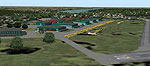
Screenshot of BCATP Total Stations Scenery.
If not already there, this installer will install a folder called BCATP_FSX in the Add-on Scenery folder of your FSX installation. This will install all of the BCATP stations that have been completed to date. If you already have BCATP_FSX installed ,PLEASE REMOVE THE BCATP FOLDER COMPLETELY before installing this one.
These airports have been located in the flight simulator to mesh with Ultimate Terrain’s roads.
Ultimate Terrain is not a necessity but will greatly enhance your flying experience.
This scenery has been made to blend in with Flight Ontario’s Landclass Scenery. Installing it will greatly enhance your visual experience.
Installation:
1. Unzip the BCATP FSX Total Stations to date.zip to a temporary folder and run the Installer.
2. Activate the BCATP Scenery in the FSX Scenery folder.
3. This installer will also install a scenery called “EXCLUDES”. You need to activate it in the FSX Scenery Library and you may have to move it as it must be placed BELOW (larger number) than the BCATP FSX Scenery.
Acknowledgments:
Flight Ontario would like acknowledge the help and support we have received from others that also enjoy this great Flight Simulator hobby.
1. Archives of the Commonwealth Air Training Plan Museum for allowing us to use and make available, the overhead photographs that they so kindly supplied to us. Also the much appreciated help and expertise from the staff of CATPM.
2. John MacKay for those aircraft, both AI and Scenery objects that he made, as well as some aircraft painting and his very generous help in tutoring that allowed us at Flight Ontario to produce ourselves, many of the aircraft scenery objects that we required.
3. Felipe Belalcazar for the aircraft scenery objects that he made for us.
4. Yeh-li Shen for the P40 aircraft scenery object that she made for us.
5. The help afforded us by the staff of the No. 6 Dunnville Museum and for the blueprints and drawings they supplied us.
6. Dr. John Higginbottom for supplying us with a set of Sectional Charts that cover the complete area of Canada where the BCATP Stations were located.
7. Bill Purcell of SNC Lavalin PROFAC for the his cooperation and help with blueprints.
Special thanks to the people who designed these FREE tools that enable folks like us to exercise our hobby:
Gmax by………..……………….…Discreet
Sbuilder by………………………...Luis Sa
AFCAD & Traffic Tools………..…Lee Swordy
DXTBmp…………………………..Martin Wright
FST Flatten………………………...Steve Greenwood
Tcalc……………………………….Richard Ludowise
Disclaimer:
The authors are not responsible for any damage, which may result from the use of this product. Use at your own risk. No warranty or guarantee is offered.
We hope you enjoy our latest work.
Grant Wilson
Al Gay
Flight Ontario
Free for all simmers · 46.43 MB · Scanned clean Oct 2026
Download speed: Free tier is capped at 0.5 Mbps (this file takes approximately 13 mins at the cap). PRO members download at full line speed.
FSX\Addon Scenery\ containing scenery and texture sub-folders.readme.txt or README file. It tells you exactly where files go, what dependencies are needed, and any quirks specific to this add-on.Use these coordinates to fly directly to this location once the mod is installed.
45.42150000,-75.69720000
Launch FSX or Prepar3D and use Flights → Load to open the downloaded .pln file. Your aircraft will be positioned at this location.
The archive bcatp_fsx_01_aug_11.zip has 5 files and directories contained within it.
This list displays the first 500 files in the package. If the package has more, you will need to download it to view them.
| Filename/Directory | File Date | File Size |
|---|---|---|
| Read-me BCATP FS9 Total Stations to date.doc | 07.31.11 | 35.00 kB |
| Read-me BCATP FS9 Total Stations to date.txt | 08.01.11 | 3.64 kB |
| BCATP_FSX_Total_Stations_To_Date_01_Aug_11.exe | 08.01.11 | 46.53 MB |
| flyawaysimulation.txt | 10.29.13 | 959 B |
| Go to Fly Away Simulation.url | 01.22.16 | 52 B |
Only PRO members can place votes.
More FSX & P3D add-ons hand-picked based on this download.
FSX Scenery
A Day On The Farm Total Plus 2 More. Complete add-on farm strips scenery comp…
 FSX Scenery
Northern England Power Stations Steam, UK. Includes Drax, Ferrybridge, Eggbor…
 FSX Scenery
Johannesburg Power Stations, South Africa. Includes Orlando and Soweto power …
 FSX Scenery
Johannesburg Power Stations, South Africa, v2.0. By Frits Beyer. Johannesburg…
FSX Scenery
Skara Scenery Bonaire X. Flamingo International Airport or Bonaire Internatio…
 FSX Scenery
Iwo Jima Scenery 1945 Update. This is a complete scenery with added effects a…
FSX Scenery
Kjeller Area Scenery X, Norway. Scenery around Kjeller airport with photoreal…
 FSX Scenery
FSX Loney's Alaska For FSX. This is a compilation of the author's Alaskan sce…
Be the first to leave a comment on this download.
Be the first to share your thoughts on this download.