

 FSX Historic & Vintage Aircraft
SP-2 Acceleration Saab J-21
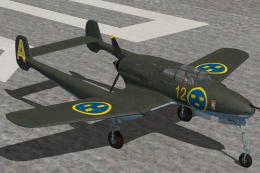
J21 Swedish fighter and ground attack aircraft. This release comes with four …
USAF-themed repaint brings a convincing U.S. Air Force look to the Saab J-21, adding crisp markings and a clean finish that suits classic fighter flying in FSX. It requires Tim Conrad’s Saab J-21 base aircraft package and includes the matching texture set for straightforward selection in the virtual cockpit.
 Rate
Rate
This is a fictive repaint in U.S. Air Force livery for the airplane by Tim Conrad (SAAB-J21.ZIP). By Bernhard Lechner.
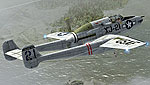
Screenshot of USAF SAAB J-21 in flight.
Installation Instructions:
1. Place the “Texture.USAF” folder into your Flight Sim X directory, under ...SimObjects\Airplanes\J-21.
2. Open the aircraft.cfg file and paste the following text into the file after the previous aircraft repaint, ensuring to replace [fltsim.XX] with the next number in sequence.
[fltsim.XX]

title=J-21_USAF

sim=J-21

model =

panel =

sound =

texture = USAF

panel_alias =

sound_alias =

kb_checklists =

kb_reference =

atc_id =

atc_id_color =

atc_parking_types =

atc_parking_code =

atc_airline=

atc_flight_number=

ui_manufacturer = Saab

ui_createdby="Piglet's Peculiar Planes"

ui_type = J-21

ui_variation = XJ-21 USAF

description =Fighter

visual_damage = 1
3. Enjoy !
Thank you for download !
Bernhard Lechner
Free for all simmers · 7.29 MB · Scanned clean Oct 2026
Download speed: Free tier is capped at 0.5 Mbps (this file takes approximately 2 mins at the cap). PRO members download at full line speed.
This file is a repaint — the package below is the base model it paints onto. Install it first, or the textures will have nothing to load onto.
texture.{airline}) inside FSX\SimObjects\Airplanes\{base-aircraft}\.aircraft.cfg in Notepad. Add a new [fltsim.X] section per the readme.readme.txt or README file. It tells you exactly where files go, what dependencies are needed, and any quirks specific to this add-on.The archive j-21_usaf.zip has 5 files and directories contained within it.
This list displays the first 500 files in the package. If the package has more, you will need to download it to view them.
| Filename/Directory | File Date | File Size |
|---|---|---|
| ReadMe_USAF.txt | 08.11.09 | 1.19 kB |
| SCREENS.zip | 08.10.09 | 4.69 MB |
| texture.USAF.zip | 08.10.09 | 2.59 MB |
| flyawaysimulation.txt | 10.29.13 | 959 B |
| Go to Fly Away Simulation.url | 01.22.16 | 52 B |
Only PRO members can place votes.
More FSX & P3D add-ons hand-picked based on this download.
FSX Historic & Vintage Aircraft
J21 Swedish fighter and ground attack aircraft. This release comes with four …
 FSX Historic & Vintage Aircraft
A supercharged B24 for night missions. Flys 50 mph faster. Original by Alphas…
 FSX Historic & Vintage Aircraft
This is a repaint only for the Warbirdsim P-51 "Little Friends I" product. Th…
 FSX Historic & Vintage Aircraft
Now version 3.14 (V3.1406). This package includes the latest Douglas C-47 Sky…
 FSX Historic & Vintage Aircraft
This is A.F. Scrub's Submarine MK-22 Spitfire Updated For Flight Simulator X.…
 FSX Historic & Vintage Aircraft
Note this aircraft originally was made by Gary Herbert due to the fact that h…
 FSX Historic & Vintage Aircraft
An FSX-native Boeing-Stearman Model 75 freeware aircraft add-on with a range …
 FSX Historic & Vintage Aircraft
Delve into the realm of historic aviation with the Mitsubishi A6M Zero Comple…
Be the first to leave a comment on this download.
Be the first to share your thoughts on this download.