


 United States of America
  FSX Scenery
Fairchild Air Force Base
Scenery Fairchild Air Force Base, Washington (WA). This is an enhanced versio…
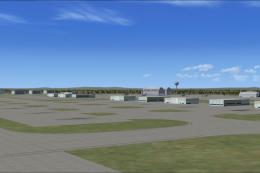
Fairchild Air Force Base (KSKA) near Spokane receives a detailed FSX scenery refresh with reworked taxiways, expanded aprons and cargo ramps, and repositioned buildings for a convincing military layout. Default-library hangars, warehouses, fire station assets, lighting, and support vehicles add lived-in ramp activity; optional Ultimate Terrain or FSGenesis landclass can further refine surroundings.
Discover a comprehensive upgrade for Fairchild Air Force Base (KSKA) located near Spokane in Washington State. Developed by Jim Cook, this freeware mod refines default simulator visuals by introducing additional cargo ramps, enhanced structures, and carefully placed ground equipment. You will find a more authentic military atmosphere through newly arranged taxiways, expanded aprons, and realistic fire station assets. The improvements benefit pilots who operate both standard and specialized aircraft in this bustling air base environment.
This add-on meticulously revises the existing ground layout to provide a more compelling rendition of the real-world installation. Taxiways (paths used by aircraft to move between runways and aprons) were tweaked for increased realism, and many Military_Cargo parking positions were included for expanded refueling or transport operations. The spacing accommodates wide military transports and smaller utility craft alike.
Various base buildings have been repositioned or replaced entirely to more closely match actual aerial references. You will notice that the control tower is carefully relocated to avoid tree encroachment, granting a clear view of runway activity. Throughout the grounds, additional warehouses and hangars have been added to replicate the busy nature of this vital Air Force facility.
The on-site fire station has also been expanded, together with realistic fire trucks standing by for emergency response. These vehicles are placed near the operational areas and integrate seamlessly with other static elements for a visually convincing landscape.
A variety of ground vehicles now populate the airfield, offering a more lifelike backdrop for flight simulation enthusiasts. You will discover fork trucks near loading bays, fuel trucks in their designated spots, and parked cars lining the staff lots. The addition of light poles helps replicate an actual daytime and nighttime setting.
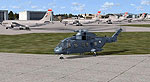
Fairchild AFB Scenery.
Though not required, Ultimate Terrain or FSGenesis landclass can further augment the surrounding geography by refining roads, water features, and elevation data. For additional military aircraft traffic, you may wish to use Just Flight’s Military Plus Packs. Both integrate seamlessly with this airfield revision, leading to more immersive scenes and varied AI movement.
All static objects and structures rely solely on default simulator libraries, so no separate downloads are needed. Jim Cook consolidated data from AirNav and satellite imagery to ensure proficiency in layout and positioning. He also used Flight 1’s AFX tool to modify runways, aprons, and taxi links, while Instant Scenery was employed for custom building placement.
AFX_KSKA_JC.bgl and KSKA_JC.bgl into your Addon Scenery/Scenery folder.Enjoy a more true-to-life representation of the Fairchild Air Force Base environment in your simulator. Jim Cook plans to refine additional military airfields in the future, so stay alert for more releases under his name.
Free for all simmers · 19.29 KB · Scanned clean Oct 2026
Download speed: Free tier is capped at 0.5 Mbps. PRO members download at full line speed.
FSX\Addon Scenery\ containing scenery and texture sub-folders.readme.txt or README file. It tells you exactly where files go, what dependencies are needed, and any quirks specific to this add-on.Use these coordinates to fly directly to this location once the mod is installed.
47.61500000,-117.65500000
Launch FSX or Prepar3D and use Flights → Load to open the downloaded .pln file. Your aircraft will be positioned at this location.
The archive fairchl.zip has 6 files and directories contained within it.
This list displays the first 500 files in the package. If the package has more, you will need to download it to view them.
| Filename/Directory | File Date | File Size |
|---|---|---|
| AFX_KSKA_JC.bgl | 05.25.08 | 34.12 kB |
| KSKA_JC.bgl | 05.25.08 | 4.18 kB |
| fairchild_read_me.txt | 05.25.08 | 1.13 kB |
| FILE_ID.DIZ | 06.04.08 | 219 B |
| flyawaysimulation.txt | 10.29.13 | 959 B |
| Go to Fly Away Simulation.url | 01.22.16 | 52 B |
Only PRO members can place votes.
More FSX & P3D add-ons hand-picked based on this download.
FSX Scenery
Scenery Fairchild Air Force Base, Washington (WA). This is an enhanced versio…
 FSX Scenery
Dover Air Force Base or Dover AFB (IATA: DOV, ICAO: KDOV, FAA LID: DOV) is a …
 FSX Scenery
Custom built hangars and buildings for Altus AFB, Oklahoma (OK), USA. AFCAD f…
 FSX Scenery
Scenery Edwards AFB Additions (KEDW), California (CA). Adds two refuel statio…
 FSX Scenery
Charleston AFB / International Airport (KCHS), South Carolina (SC). A complet…
 FSX Scenery
Scenery Griffiss AFB New York (NY) as it was back in the late 1980's before i…
 FSX Scenery
This freeware package refines the stock representation of Nellis Air Force Ba…
 FSX Scenery
Mountain Home AFB (KMUO), Idaho (ID). The Air Force has been consolidating ai…
Be the first to leave a comment on this download.
Be the first to share your thoughts on this download.