


 Germany
  FSX Scenery
Seven Castles
Seven Castles (Himeji castle, Kumamoto castle, Osaka castle, Edo castle, E Ya…
Seven Row Scenery v2.0 expands northern Germany flying in FSX with enhanced airports and island detail across EDXW, EDWL, EDWJ, EDWY, EDWG, EDWR, EDWZ, and EDKU. It adds refreshed beaches, complete VFR marker points, and integrates cleanly with the default terrain or higher-resolution mesh.
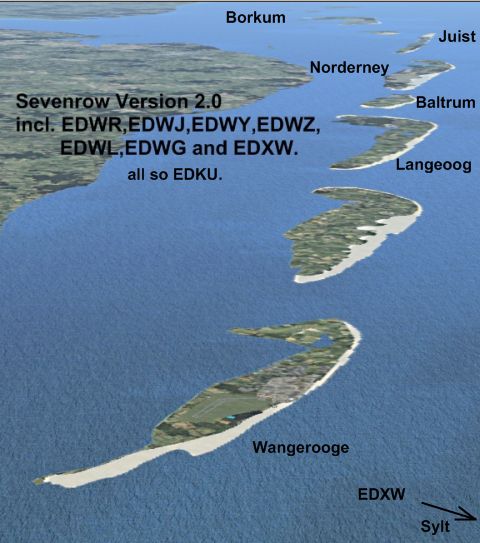
Seven Row v2.0. This is the "Seven Row" Scenery from Germany for the FSX. You find the airports and more from: EDXW, EDWL, EDWJ, EDWY, EDWG, EDWR, EDWZ and EDKU. The scenery is compatible with the standard FSX installation or with newer mesh and terrain installation. Include is a setup .exe file for the installation. This version has the new beach at islands and all airports and all marker points. By Ulrich Loehl.
Seven Row Scenery.
This is the new "Seven Row2.0" Scenery from Germany for the FSX. You find the Airports and more from:
EDXW, EDWL, EDWJ, EDWY, EDWG, EDWR,EDWZ, und EDKU.
Delete the old Version "Sevenrow 1.0 FSX" before install new !
Activate the New Version in the FSX Scenery Manager when not installed in Root from Addon On Folders !
Or copied, after run setup, all Folder to the root from Addon On, exept all files to the scenery and the texture folder from ADDON.
The Scenery is compatible to the Standard FSX Installation or with newer Mesh and Terrain Installation.
Include in this is a setup Exe file for the Installation. After this you have copied the effects File to the FSX effects Folder. Overwrite ? Yes!
This Version has the missed Beach from all Islands.
Also all Airport include with VFR Marker Points.
I hope you have fun.
Regards
Ulrich Loehl
Germany
Free for all simmers · 3.45 MB · Scanned clean Oct 2026
Download speed: Free tier is capped at 0.5 Mbps. PRO members download at full line speed.
FSX\Addon Scenery\ containing scenery and texture sub-folders.readme.txt or README file. It tells you exactly where files go, what dependencies are needed, and any quirks specific to this add-on.Use these coordinates to fly directly to this location once the mod is installed.
54.91325000,8.34047000
Launch FSX or Prepar3D and use Flights → Load to open the downloaded .pln file. Your aircraft will be positioned at this location.
The archive sevenr20.zip has 6 files and directories contained within it.
This list displays the first 500 files in the package. If the package has more, you will need to download it to view them.
| Filename/Directory | File Date | File Size |
|---|---|---|
| Sevenrow2.0_setup.exe | 05.21.09 | 3.27 MB |
| Sevenrow2_0.jpg | 05.21.09 | 212.04 kB |
| file_id.diz | 05.21.09 | 517 B |
| readme_first.txt | 05.21.09 | 921 B |
| flyawaysimulation.txt | 10.29.13 | 959 B |
| Go to Fly Away Simulation.url | 01.22.16 | 52 B |
Only PRO members can place votes.
More FSX & P3D add-ons hand-picked based on this download.
FSX Scenery
Seven Castles (Himeji castle, Kumamoto castle, Osaka castle, Edo castle, E Ya…
 FSX Scenery
Skara Scenery Bonaire X. Flamingo International Airport or Bonaire Internatio…
 FSX Scenery
Iwo Jima Scenery 1945 Update. This is a complete scenery with added effects a…
FSX Scenery
Kjeller Area Scenery X, Norway. Scenery around Kjeller airport with photoreal…
 FSX Scenery
FSX Loney's Alaska For FSX. This is a compilation of the author's Alaskan sce…
 FSX Scenery
For users of Flight Simulator X (and FSX: Steam Edition) and/or Prepar3D, ter…
 FSX Scenery
This freeware release by developer Aime Leclercq introduces revised highways …
 FSX Scenery
Team GEX Enhanced Autogen World. This package upgrades 522 world wide autogen…
Read what other simmers think, or add your own.

hi Jonnie B. Delete in the scenery folder from sevenrow the file :cvxBORKUMEXCLUDE.BGL or rename this file at the end, example : cvxBORKUMEXCLUDE.BGx
Then you can drive at Borkum
Regards ULI

Very nicely done additions on the ground at and around the airports - almost perfect. I had to take away one star because the ground on Borkum is a giant swamp - you cannot land there!