


 United States of America
  FSX Scenery
Hill AFB
Experience an extensively updated rendition of Hill AFB (KHIF) in Ogden, Utah…
Harris Hill Gliderport (4NY8) scenery refreshes the Elmira, New York soaring site in FSX with a second parallel runway, realistic airfield buildings, and carefully placed static gliders, aircraft, vehicles, and clutter for a lived-in feel. Uses only stock objects and aligns layout details to current airport diagrams for believable operations.
Harris Hill Gliderport (4NY8), Elmira, New York (NY). Here is an improved version of the stock Harris Hill Gliderport. It was a single runway in FSX with no buildings at all. The second parallel runway was added, along with several buildings, static gliders, planes, vehicles, and other objects. By Jim Cook.
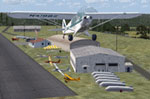
Harris Hill Gliderport Scenery.
Here is an improved version of the stock Harris Hill Gliderport. It was a single runway in FSX with no buildings at all. The second parallel runway was added, along with several buildings, static gliders, planes, vehicles, and other objects.
Works best with Ultimate Terrain X. I also highly recommend the Low 'n Slow New York State landclass.
I use Ultimate Terrain and FSGenesis landclass but they are not required. All objects are stock FSX so no additional object libraries are needed. Updates made using AirNav diagrams and Google Earth to be as accurate as possible. All work done with Flight 1's AFX program and Instant Scenery.
INSTALLATION:
Extract the file 4NY8_AFX_JC.bgl and 4NY8_JC.bgl into your Addon Scenery/Scenery folder, re-start FSX and enjoy.
Jim Cook
Free for all simmers · 14.23 KB · Scanned clean Oct 2026
Download speed: Free tier is capped at 0.5 Mbps. PRO members download at full line speed.
FSX\Addon Scenery\ containing scenery and texture sub-folders.readme.txt or README file. It tells you exactly where files go, what dependencies are needed, and any quirks specific to this add-on.Use these coordinates to fly directly to this location once the mod is installed.
42.13900000,-76.89200000
Launch FSX or Prepar3D and use Flights → Load to open the downloaded .pln file. Your aircraft will be positioned at this location.
The archive harris.zip has 6 files and directories contained within it.
This list displays the first 500 files in the package. If the package has more, you will need to download it to view them.
| Filename/Directory | File Date | File Size |
|---|---|---|
| Harris_Hill_readme.txt | 07.31.09 | 947 B |
| 4NY8_AFX_JC.bgl | 07.31.09 | 1.93 kB |
| 4NY8_JC.bgl | 07.31.09 | 2.25 kB |
| harris_fs.gif | 08.02.09 | 10.40 kB |
| flyawaysimulation.txt | 10.29.13 | 959 B |
| Go to Fly Away Simulation.url | 01.22.16 | 52 B |
Only PRO members can place votes.
More FSX & P3D add-ons hand-picked based on this download.
FSX Scenery
Experience an extensively updated rendition of Hill AFB (KHIF) in Ogden, Utah…
 FSX Scenery
Broken Hill Photoreal Scenery, Australia. Photoreal scenery covering Brokem H…
 FSX Scenery
Hill Top Airport (JY43), New Jersey (NJ), USA. Current real world private air…
 FSX Scenery
Winter Hill TV Transmitter, Manchester, UK. By Stewart Haworth. Winter Hill T…
 FSX Scenery
Linley Hill Scenery for FSX and Horizon GenX Photographic Scenery Vol. 3 by T…
 FSX Scenery
Skara Scenery Bonaire X. Flamingo International Airport or Bonaire Internatio…
 FSX Scenery
Iwo Jima Scenery 1945 Update. This is a complete scenery with added effects a…
FSX Scenery
Kjeller Area Scenery X, Norway. Scenery around Kjeller airport with photoreal…
Read what other simmers think, or add your own.

Hi, I'm late to the party. Just wanted to tell you thank you and great work. I enjoy using gliders taking off and following the susquehanna river down to scranton wilkes-barre along the way trying to hit a thermal.