

 MSFS Utilities & Tools
PERFLIGHT Add-on Manager, Pre-Flight Checklist & Service Launcher
PERFLIGHT from Innersanctum Studios handles mod selection, flight-service lau…
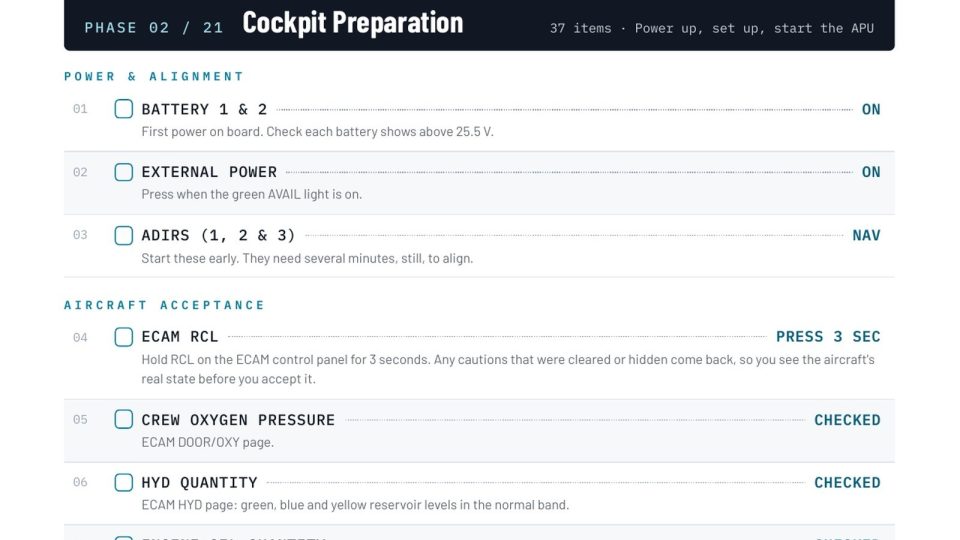
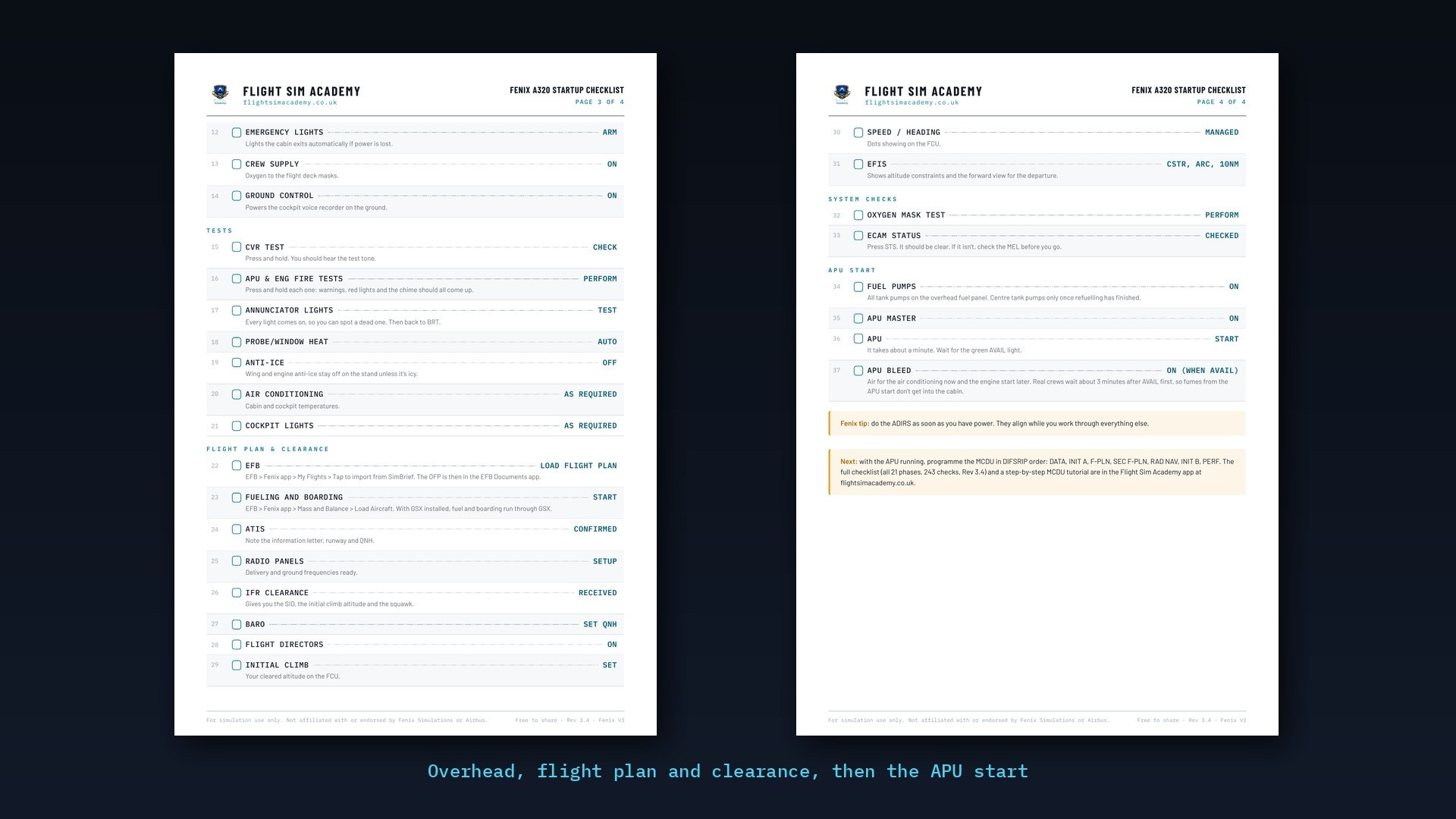
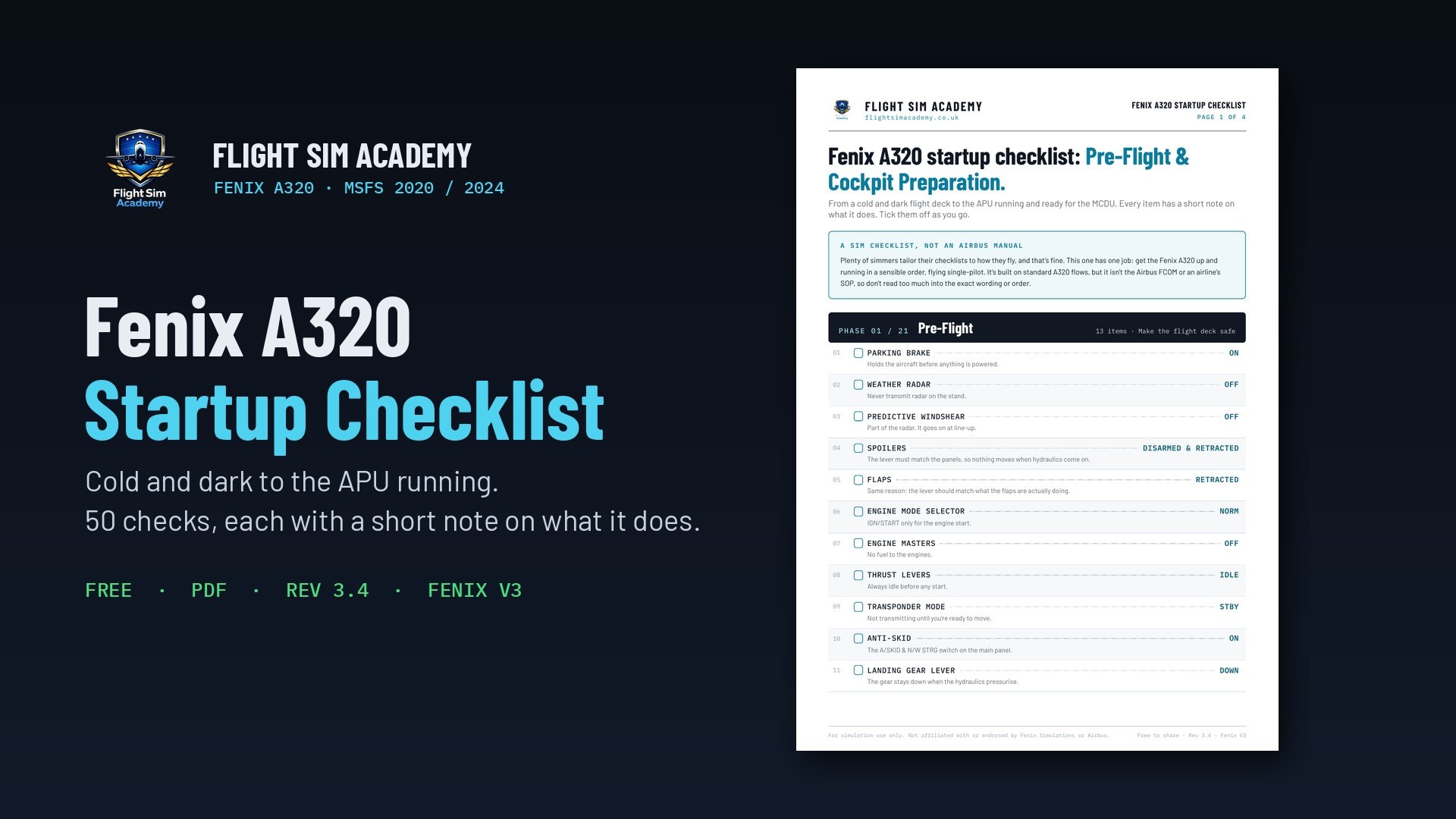
The printable, four-page A4 PDF checklist requires the Fenix Airbus A320 and guides single-pilot preparation through 50 checks from cold and dark to APU startup in Microsoft Flight Simulator 2020 and 2024. Short explanations clarify pre-flight and cockpit preparation actions, including aircraft acceptance checks reviewed against a real A320 captain’s routine, readying the aircraft for MCDU setup.
 Rate
 By Flight Sim Academy
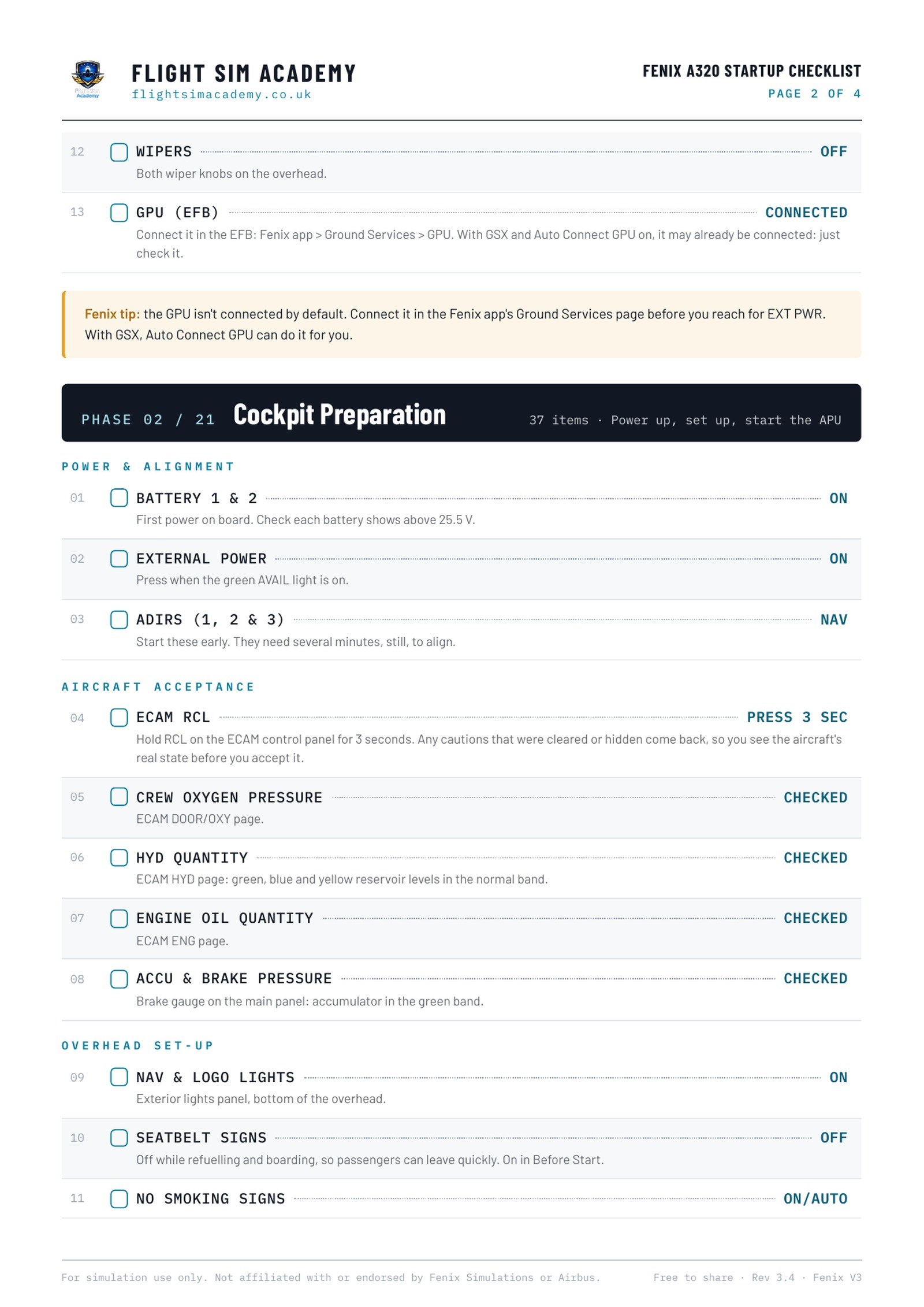
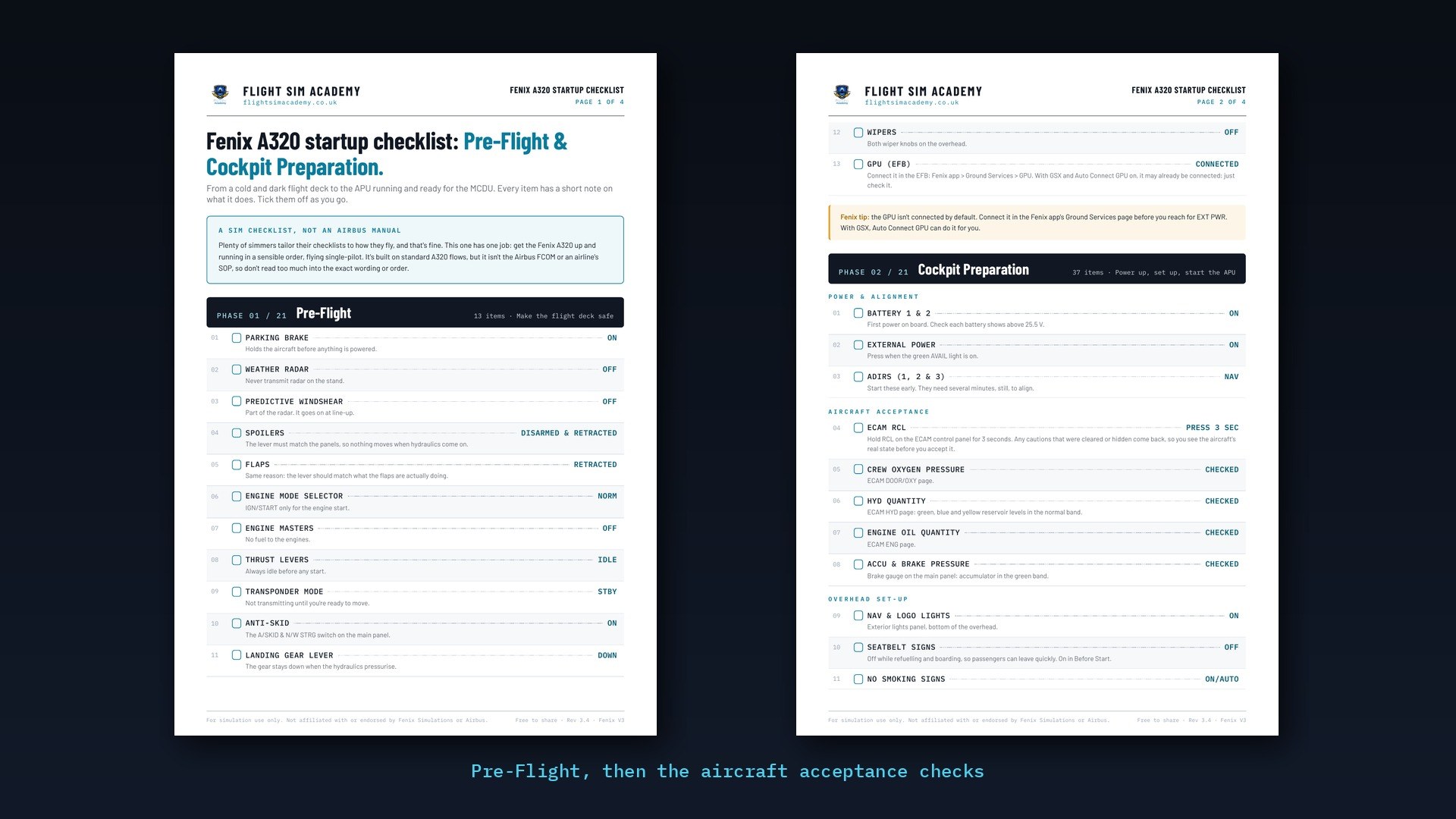

Putting the GPU connection ahead of external power struck me as a considered Fenix-specific choice. That reminder belongs before you reach for the overhead, not after you've wondered why power isn't available. The aircraft acceptance section earned its place during my run-through: I worked through ECAM recall, crew oxygen, and the hydraulic and oil quantities instead of heading straight for APU startup. It made me slow down and check the aircraft I was about to use. That's the habit I'd want this checklist to teach. The explanatory notes give those checks a purpose without turning each one into a systems lesson. For someone learning the Fenix cockpit, I'd favor that approach over memorizing switch positions. I'd keep it beside the sim as a learning aid, rather than treat it as an airline procedure.
Flight Sim Academy’s free, printable checklist takes the Fenix Airbus A320 from a cold and dark flight deck to a running APU, ready for MCDU setup in Microsoft Flight Simulator 2020 and Microsoft Flight Simulator 2024. Its 50 checks include short explanations of what each action does and why it matters.
You’ll need the Fenix A320, a payware aircraft sold separately. The download is a four-page A4 PDF, not an aircraft or an in-sim panel. Nothing goes into the simulator’s folders; print the document, open it on a tablet, or keep it on a second screen.
The checks follow a single-pilot order across these two phases. The accompanying notes help you learn the flow as you work through it, with more context than a bare list of switch positions.
An aircraft acceptance block, reviewed against a real A320 captain’s setup routine, covers the following checks:
For coverage beyond this startup segment, Flight Sim Academy also offers a full 21-phase checklist with 243 checks from cold and dark to shutdown, plus an interactive training app.
For simulation use only. Not affiliated with or endorsed by Fenix Simulations or Airbus.
Free for all simmers · 216.38 KB · Scanned clean Nov 2026
Download speed: Free tier is capped at 2 Mbps. PRO members download at full line speed.
Rev 3.4 – Added an aircraft acceptance block after ADIRS: ECAM RCL, crew oxygen, hydraulic quantity, engine oil quantity, accu & brake pressure. Notes reviewed against a real A320 captain's routine. Updated for Fenix V3.
%LOCALAPPDATA%\Packages\Microsoft.FlightSimulator_8wekyb3d8bbwe\LocalCache\Packages\Community\. Steam version: %APPDATA%\Microsoft Flight Simulator\Packages\Community\. Tip: enable Developer Mode in MSFS to see your exact Community folder path.readme.txt or README file. It tells you exactly where files go, what dependencies are needed, and any quirks specific to this add-on.Flight Sim Academy makes training tools for the Fenix A320 in MSFS. Our free startup checklist takes you from cold and dark to the APU running, with a short note on every item.
Are you Flight Sim Academy? Sign in to Fly Away Creators for download stats, comment replies and updates. Make add-ons? Publish them here.
Only PRO members can place votes.
More MSFS add-ons hand-picked based on this download.
MSFS Utilities & Tools
PERFLIGHT from Innersanctum Studios handles mod selection, flight-service lau…
 MSFS Utilities & Tools
Jetstream gives Microsoft Flight Simulator 2020 and Microsoft Flight Simulato…
 MSFS Utilities & Tools
AeroTuneMFS runs alongside Microsoft Flight Simulator 2020 and Microsoft Flig…
 MSFS Utilities & Tools
TechLog tracks maintenance, wear and defects across supported airliners in Mi…
 MSFS Utilities & Tools
MotionDeck by ClearedtoCode adds a free physics-driven cockpit camera and pho…
 MSFS Utilities & Tools
Vantage lets you watch a flight through airport cameras, automated cinematic …
 MSFS Utilities & Tools
Fronsky EFB runs alongside Microsoft Flight Simulator 2020 and Microsoft Flig…
 MSFS Utilities & Tools
CheckRide records and grades your flights in Microsoft Flight Simulator 2020 …
Be the first to leave a comment on this download.
Be the first to share your thoughts on this download.