


 United States of America
  FSX Scenery
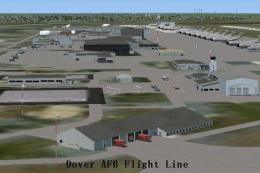
Dover AFB
Dover Air Force Base or Dover AFB (IATA: DOV, ICAO: KDOV, FAA LID: DOV) is a …
Robins Air Force Base (KWRB) scenery refresh brings Warner Robins, Georgia to life with purpose-built military cargo and combat parking, a detailed fire station with emergency vehicles, realistic fuel trucks, Humvees, and improved lighting. Updated taxiways, aprons, and building placements replace default layouts for more authentic operations in Microsoft Flight Simulator X.
This robust freeware package, created by Jim Cook, refines the existing representation of Robins Air Force Base (ICAO code KWRB) in Warner Robins, Georgia. It augments the virtual airfield, ensuring that military cargo operations, combat readiness areas, and various support activities are accurately depicted within Microsoft Flight Simulator X.
The developer has added dedicated Military_Cargo and Military_Combat parking positions (also known as ramps or slots in flight simulation) to accommodate large and specialized aircraft. By incorporating a new fire station—complete with operational fire trucks—immersive realism has been significantly increased. In addition, many existing default structures were removed or substituted with updated models, and parked fuel trucks have been strategically placed to reflect real-world base layouts. Furthermore, Humvee vehicles, well-lit parking areas, and other static objects give the environment a more authentic feel.
This scenery enhancement uses standard FSX objects, so there are no external library dependencies. It seamlessly complements Just Flight’s Military Plus Packs for anyone wanting to populate the airfield with a diverse range of military models. Jim Cook also tested it in conjunction with Ultimate Terrain and FSGenesis landclass add-ons without issue; however, neither of these is strictly necessary to benefit from the overall upgrades.
Robins Air Force Base, named in honor of Brigadier General Augustine Warner Robins, is a critical logistics hub for the United States Air Force. It is recognized for its extensive aircraft maintenance capabilities and is often viewed as one of the region’s major industrial complexes. Situated near the city of Warner Robins, the base routinely hosts large cargo planes and specialized units, making this improved scenery pack ideal for virtual pilots who wish to simulate strategic deployment scenarios or regular transport sorties.
All modifications were executed with Flight 1’s AFX application (used for airport layout editing) and Instant Scenery (for object placement). The visual changes are consistent with publicly available diagrams and the latest Google Earth imagery, affording a higher level of precision. These refinements aim to enhance the overall sense of immersion when taxiing, parking, or performing ground operations at the base.
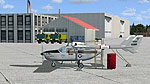
Robins AFB Scenery.
To install, unwrap both AFX_KWRB_JC.bgl and KWRB_JC.bgl and move them into the “Addon Scenery/Scenery” directory of your FSX installation. Relaunch the simulator afterward to confirm the changes. This process ensures that the airfield updates are loaded during startup.
Credit goes to Jim Cook for producing this invaluable enhancement. He plans to address other military airfields when schedule permits, adding further detail to United States bases in FSX.
Free for all simmers · 15.6 KB · Scanned clean Oct 2026
Download speed: Free tier is capped at 0.5 Mbps. PRO members download at full line speed.
FSX\Addon Scenery\ containing scenery and texture sub-folders.readme.txt or README file. It tells you exactly where files go, what dependencies are needed, and any quirks specific to this add-on.Use these coordinates to fly directly to this location once the mod is installed.
32.64020000,-83.59190000
Launch FSX or Prepar3D and use Flights → Load to open the downloaded .pln file. Your aircraft will be positioned at this location.
The archive robins.zip has 6 files and directories contained within it.
This list displays the first 500 files in the package. If the package has more, you will need to download it to view them.
| Filename/Directory | File Date | File Size |
|---|---|---|
| AFX_KWRB_JC.bgl | 06.05.08 | 29.05 kB |
| KWRB_JC.bgl | 06.05.08 | 3.04 kB |
| robins_read_me.txt | 06.05.08 | 1.03 kB |
| FILE_ID.DIZ | 06.10.08 | 232 B |
| flyawaysimulation.txt | 10.29.13 | 959 B |
| Go to Fly Away Simulation.url | 01.22.16 | 52 B |
Only PRO members can place votes.
More FSX & P3D add-ons hand-picked based on this download.
FSX Scenery
Dover Air Force Base or Dover AFB (IATA: DOV, ICAO: KDOV, FAA LID: DOV) is a …
 FSX Scenery
Custom built hangars and buildings for Altus AFB, Oklahoma (OK), USA. AFCAD f…
 FSX Scenery
Scenery Edwards AFB Additions (KEDW), California (CA). Adds two refuel statio…
 FSX Scenery
Charleston AFB / International Airport (KCHS), South Carolina (SC). A complet…
 FSX Scenery
Scenery Griffiss AFB New York (NY) as it was back in the late 1980's before i…
 FSX Scenery
This freeware package refines the stock representation of Nellis Air Force Ba…
 FSX Scenery
Mountain Home AFB (KMUO), Idaho (ID). The Air Force has been consolidating ai…
 FSX Scenery
(KCOS), CO. Custom built detailed terminal, hangars, nearby buildings, hotels…
Be the first to leave a comment on this download.
Be the first to share your thoughts on this download.