

 FS2004 Civil Jet Aircraft
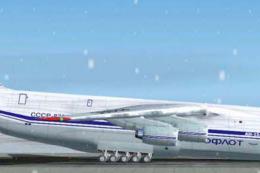
Antonov An-124
A Gmax version with many animated parts, high detail 3D model and highlight r…
Antonov An-124 paint kit delivers layered templates for creating sharp custom liveries, with ready-to-use tail and engine textures, mirrored wing mapping, and overlapping fuselage sections to preserve detail. Templates run larger than the model bitmaps for optional 1024x1024 upscaling, and requires Thomas Ruth’s AN124-4.ZIP for FS2004.
 Rate
Rate
Paint Kit for use with AN124-4.ZIP by Thomas Ruth.
Screenshot of Antonov An-124 on the ground.
Tail and engine textures can be used as they are. The wing textures have been mirrored left/right so i included only one side. The fuselage texture is a little bit more complicated. There's one entire texture I've painted on. After its finished you've just to cut out the right 1024x1024 and save it as fuse01 plus cut out the left 1024x1024 and save it as fuse02. NOTICE that the fuse01 and fuse02 overlap a little bit. This is not a bug. I've done it to boost the texture quality a little bit. NOTICE also that the templates are a little bit bigger then the bitmaps used in the fs9 model. This is also not a bug. You CAN increase each bitmap size up to 1024x1024 pixels if you want to have a better quality.
Free for all simmers · 1.27 MB · Scanned clean Oct 2026
Download speed: Free tier is capped at 0.5 Mbps. PRO members download at full line speed.
This add-on may require the following files to function properly. If this is a repaint, the dependency below is likely the base aircraft package.
FS9\Aircraft\, FS9\Addon Scenery\, FS9\Gauges\, or FS9\Effects\.readme.txt or README file. It tells you exactly where files go, what dependencies are needed, and any quirks specific to this add-on.The archive an124kit.zip has 9 files and directories contained within it.
This list displays the first 500 files in the package. If the package has more, you will need to download it to view them.
| Filename/Directory | File Date | File Size |
|---|---|---|
| fuse01_t.bmp | 08.05.03 | 3.00 MB |
| fuse_t.bmp | 08.05.03 | 5.99 MB |
| cowling_t.bmp | 08.05.03 | 3.00 MB |
| fuse02_t.bmp | 08.05.03 | 3.00 MB |
| paintkit.txt | 08.09.03 | 772 B |
| tail_t.bmp | 08.05.03 | 3.00 MB |
| wing_t.bmp | 08.05.03 | 3.00 MB |
| flyawaysimulation.txt | 10.29.13 | 959 B |
| Go to Fly Away Simulation.url | 01.22.16 | 52 B |
Only PRO members can place votes.
More FS2004 add-ons hand-picked based on this download.
FS2004 Civil Jet Aircraft
A Gmax version with many animated parts, high detail 3D model and highlight r…
 FS2004 Civil Jet Aircraft
Cargo Turk Antonov An-124 in special livery. Textures only; requires AN124-4.…
 FS2004 Civil Jet Aircraft
The default LearJet in Alaskan Winds colors and high detail reflective textur…
 FS2004 Civil Jet Aircraft
Take a flight in one of Boeing's newest additions,the Boeing 717-200.This is …
 FS2004 Civil Jet Aircraft
FS2004 MelJet Boeing 777-200 Paint Kit. A paintkit for the B777-200 model by …
 FS2004 Civil Jet Aircraft
This second-generation paint kit refines the visual fidelity and structural d…
 FS2004 Civil Jet Aircraft
New repaint and VA policy! Dreamwings logo. You don't have to ask us if you w…
 FS2004 Civil Jet Aircraft
This paint kit includes layered textures for the fuselage in all three popula…
Be the first to leave a comment on this download.
Be the first to share your thoughts on this download.