

iniBuilds A380 for MSFS: Real Data, Console Access & Performance
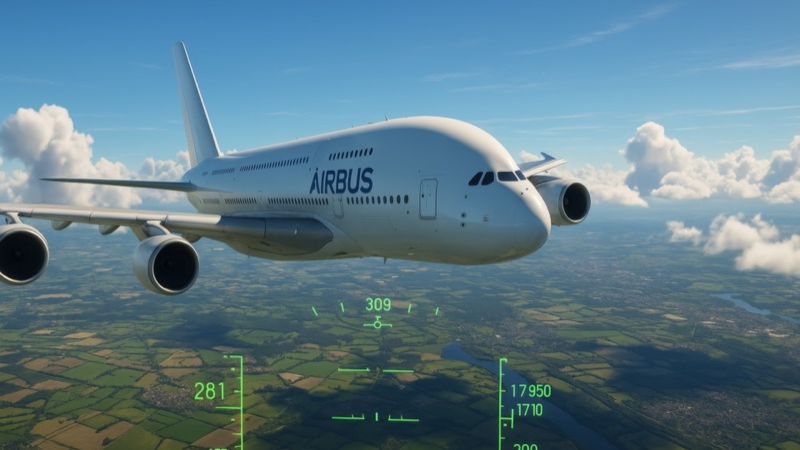
iniBuilds is reviving its Airbus A380 for Microsoft Flight Simulator with new impetus, utilizing real cockpit measurements and advanced data to refine system fidelity. This…
Editorial newsdesk · 525 articles
Daily reporting, in-depth reviews and freeware add-on coverage across Microsoft Flight Simulator, FSX, X-Plane 12 and Prepar3D — written and edited by industry veteran Ian Stephens.
iniBuilds is reviving its Airbus A380 for Microsoft Flight Simulator with new impetus, utilizing real cockpit measurements and advanced data to refine system fidelity. This…
Each platform has its own archive — reviews, releases, guides and fixes, newest first.

Immerse yourself in a refined selection of freeware Boeing 747 expansions tailored for FSX, FSX:SE, and P3D, designed to boost flight realism through enhanced cockpit fidelity,…
-400.jpg)
Virtual aviation enthusiasts can uncover a trove of hidden gems in FSX, from intriguing “secret missions” to discovering iconic landmarks like the Eiffel Tower or Mount Rushmore.…

Boost your FSX performance with these practical configuration tweaks that refine frame rates, smooth out stutters, and sharpen in-game scenery. This concise reference covers…

Ever wondered how comprehensive flight simulation really is compared to genuine cockpit time? This article delves into how advanced home-based software can enhance pilot…
The twelve most recent stories across every platform. Open a newsdesk above for the full archive.

Flight simulator flight physics lives in the flight model: a real-time dynamics loop that turns control inputs, weather, and aircraft configuration into lift, drag, thrust,…

Microsoft Flight Simulator 2024’s Sim Update 3 boosts in-sim efficiency with optimized GPU usage, enhanced VR fluidity, and fine-tuned avionics. The revamped ATC structure and…

REX Simulations’ new Atmos CORE for Microsoft Flight Simulator 2024 refines clouds, haze, and color balancing while preserving frame rates. Coupled with a discounted upgrade…

Developer COWS brings the Diamond DA40-NG to MSFS 2020 and 2024, showcasing precise flight dynamics, custom circuit breakers, and an advanced EIS for thorough training…

iniBuilds is reviving its Airbus A380 for Microsoft Flight Simulator with new impetus, utilizing real cockpit measurements and advanced data to refine system fidelity. This…


X-Plane 12.2.0 revolutionizes flight simulation with an upgraded exposure fusion approach, refined volumetric clouds, and optimized VR performance, forging a heightened sense of…

iniBuilds has introduced an upgraded Airbus A350 featuring a newly integrated Heads-Up Display, refined hydraulic mechanisms for more genuine flap operation, and an upcoming Xbox…

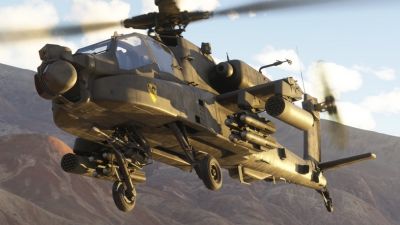
This innovative release from KwikFlight merges advanced avionics, custom-coded weaponry, and a forgiving flight model to present an Apache-style rotorcraft that stretches MSFS…

Microsoft Flight Simulator 2024 SU3 Beta unveils local content downloads, advanced memory diagnostics, and overhauled flight-model physics, delivering smoother gameplay and…

Just Flight’s BAe 146 for X-Plane 12 features a refined flight envelope, high-fidelity cockpit systems, and eight diversified variants—covering civilian, cargo, and military…

Sim Update 2 (v1.4.20.0) for Microsoft Flight Simulator 2024 revolutionizes the experience with meticulously refined flight models, fortified stability, and more authentic VR…

Experience ultra-realistic flight operations across two scenic Californian aerodromes that showcase robust weather modeling, pilot-triggered lighting, and seamlessly integrated…
There’s no single “best” flight simulator — the right choice depends on your priorities. Microsoft Flight Simulator (MSFS 2024) offers stunning photorealistic visuals, global Bing satellite coverage, and live weather. X-Plane 12 is widely regarded as having the most realistic flight model. Prepar3D is favoured by professional training applications. FSX remains popular thanks to its massive freeware library.
For most home simmers in 2026, MSFS is the recommended starting point. Browse our MSFS coverage for reviews and add-on guides.
Many are. Fly Away Simulation hosts tens of thousands of free add-ons covering aircraft, scenery, missions, utilities, and liveries for MSFS, FSX, X-Plane, and Prepar3D. The freeware community has been the heart of flight simulation for over 30 years.
Premium payware add-ons exist too — typically offering higher fidelity systems, exclusive aircraft, and detailed scenery. Visit our downloads library to browse the full freeware catalog.
MSFS will run on most modern laptops that meet the minimum spec: 16 GB RAM, a dedicated GPU (GTX 1660 or better), and ideally an SSD for asset streaming. For high or ultra settings you’ll want a current-generation gaming laptop with an RTX 4060+ and 32 GB RAM.
Lower-spec systems can still play with reduced render distance, lower texture quality, and offline regions. Our MSFS news covers performance optimization regularly.
FSX (Flight Simulator X) launched in 2006 and remains hugely popular for its unmatched library of freeware and payware add-ons. It uses a 32-bit engine, runs on modest hardware, and is supported by the dedicated FSX:SE (Steam Edition) community.
MSFS (Microsoft Flight Simulator 2020 / 2024) is the modern successor — a complete rebuild featuring photoreal Bing satellite scenery, live real-world weather, AI-generated airports, and continuous evergreen updates. Both platforms remain actively played in 2026 for different reasons.
Installation varies by simulator. MSFS uses an in-game Content Manager plus a Community folder for manual add-ons. FSX / Prepar3D typically use either an installer or a manual drop into the Aircraft or Scenery folders. X-Plane uses the Custom Aircraft and Custom Scenery folders.
Every download on Fly Away Simulation includes installation instructions specific to that file. New to add-ons? Start with our installing add-ons guide or the downloads library.
Yes — for many users, FSX remains an excellent choice in 2026. The platform has an unmatched library of free and payware add-ons, runs comfortably on older hardware, and the Steam Edition (FSX:SE) is still actively maintained by its community.
If you value the legacy add-on ecosystem, photo scenery packages, or want flight sim on a lower-spec PC, FSX is still a strong pick. See our FSX news archive.
The news is one part of it — the library, the answers and the community are the rest.